

To ensure that the generator’s signal is being transmitted successfully, we need to test its output, and the quickest way to do this is to use a Spooky2 Remote.
Hardware Part
Set up Spooky2 Remote as usual. Connect Spooky2 Remote with Boost.

Note:
You don’t need to put DNA samples in Remote during this test.
Software Part
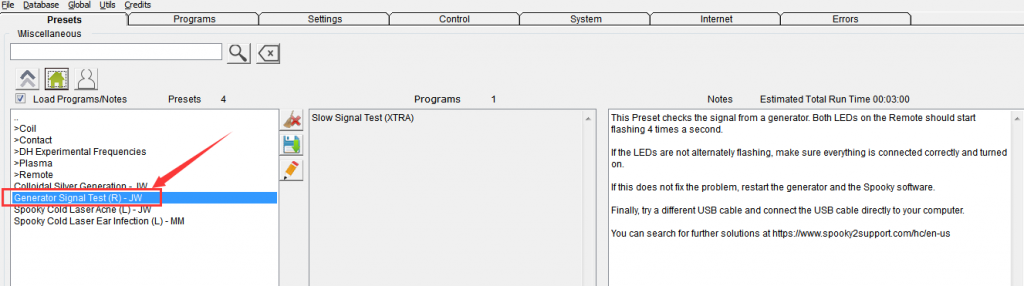
1. Open Spooky2 software, click >Miscellaneous Generator Signal Test (R) – JW in Presets tab.
2. Go to Control tab, tick “Overwrite Generator”, choose the port number of your generator and click “Start”.

If you see both LEDs on the Remote start flashing 4 times a second, then your generator is good to go. If not, click the Presets tab again and refer to the preset’s Notes for troubleshooting instructions.


I tried to verify my output voltage recently and didn’t get what I expected. I did not buy a “boost” output board and that should not be necessary to test voltage output and it’s stability. I measure straight from the bnc on each output and got substantially different readings even though I expect half of what the voltage is set for in the control panel. In contact mode having these broad variations lead to frequent spiking and pain because the machine can’t be trusted to perform as it’s set for. N matter the frequency or waveform is the program says it’s set for 20 volts then I expect no more than 10 volta in actual experience but that’s not what I get . Am I missing something?
Hi, claire. You can use this method to test amplitude/voltage of your generator output: https://www.spooky2support.com/hc/en-us/articles/216952788
Hi, I did the generator test and both lights flashed back and forth so it’s working. However, when Im running the program, no lights. Im running Terrain low power 1V (R) – BY . Are the lights not showing because its the LOW terrain?
Dear friend, four factors determine how the LEDs respond to the signal: frequency, waveform, offset, and amplitude. You can read more information from this blog: https://www.spooky2-mall.com/blog/what-does-your-spooky2-remote-led-light-indicate/. Hope it helps. Any questions, feel free to contact us.
Thank you. So since I did the test and the lights worked then, (which means the remote is working) it’s okay now that there are no lights on at all while I’m running low terrain? ?
I am having the same issue – ran the 11 day terrain on low voltage – 7 days in LEDs were working, then crashed – updated the firmware as had chance and that was an error…now no LEDs (this was post testing and then rerunning).
Additionally, swapped other port remote over and that continued to work and no issues…
Odd as on test it worked – is it working with no lights now on low voltage Terrain (it was flashing previously as aforementioned)?
Hello friend, please contact us by email: support@spooky2-mall.com, we will provide professional engineers to help you answer your questions. Thank you for your understanding and support.
the screen lights up but the display is blank ( nothing but a light blank screen ) can I replace the screen
Hi Lanny, sorry to see that you are suffering from this issue, please contact us by email: support@spooky2-mall.com and we will arrange a professional to troubleshoot this issue for you. Thanks for your understanding.
Can you leave DNA samples in the remote for the test?
Hello friend
When running a signal test, you do not need to place DNA samples in the remote.
Have a nice day.
what happened if you don’t remove your DNA samples when running a signal test? It doesn’t work?
Dear Joe,
Thank you for your question!
When performing a signal test with Spooky Remote, you don’t need to place DNA samples inside. The test will still work, as it focuses on verifying the generator’s output rather than delivering frequencies to a target.
Let us know if you need further clarification.
Best regards,
Spooky2 Team