


Scalar biofeedback scanning is an advanced technology that leverages the power of scalar energy to detect and correct imbalances in the body’s energy field. The key to healing lies in information — scalar information. By charging the body and offering the much-needed energy to open and remove blockages, Spooky2 Scalar restores the body’s natural healing mechanisms. As the first scalar energy device to provide four different methods of sending healing scalar waves, Spooky2 Scalar offers profound healing benefits.
By understanding how your body responds to scalar frequencies, you can restore balance and vitality, improving both your physical and mental well-being. In this blog, we’ll explore scalar biofeedback scanning, its benefits, and how to use it to unlock the full potential of your body’s energy system.
Spooky2 Scalar Biofeedback Scan
The Spooky2 Scalar Biofeedback Scan is a method that uses biofeedback to identify the most suitable frequencies for an individual, enabling personalized healing based on the body’s response to scalar energy.
1. Unique Capability of Spooky2 Scalar
- Exclusive Technology: Spooky2 Scalar is the only scalar device capable of performing such biofeedback scans. This allows for a more precise and individualized approach to healing.
- Scalar Digitizer: The Spooky2 Scalar Digitizer is used to measure subtle changes within the scalar field, capturing the body’s response to scalar energy.
2. How the Biofeedback Scan Works
- Generator Setup: The scan requires two generators, both from the GeneratorX Pro model:
- G2: Modulates the scalar field, creating the healing frequencies.
- G1: Measures the body’s response to the frequencies being applied within the scalar field.
- Energy Field Interaction: These generators work in unison, with G2 modulating the scalar field and G1 recording the body’s response. This interaction allows for the identification of frequencies that are most effective for energy balancing and healing.
3. Targeted Healing with Identified Frequencies
- Personalized Frequencies: The scan identifies the frequencies that resonate most effectively with the body, helping to restore energetic balance.
- Focused Healing: Once the most suitable frequencies are identified, they can be used for targeted healing programs, addressing specific health concerns or overall wellness.
This method ensures a customized approach to healing, leveraging the power of scalar energy to support the body’s natural healing mechanisms.
The Differences Between Scalar Scan and Other Ways of BFB Scan
Biofeedback scanning methods, such as pulse biofeedback, tens scans, and sample digitizer scans, all serve different purposes in assessing the body’s health. Scalar biofeedback scanning, however, focuses on the body’s response to scalar energy, which offers unique insights into both physical and emotional health.
1. Scalar vs. Other Biofeedback Methods
While traditional biofeedback scans monitor physiological responses like heart rate, scalar biofeedback scanning analyzes energy imbalances within the body’s energetic field, providing a deeper understanding of both physical and emotional states.
2. Hardware Requirements
Different biofeedback scans require specific hardware setups. Here’s a comparison of the necessary equipment:
| Scan Type | Required Hardware | Connection Type | Advantages |
|---|---|---|---|
| Pulse Scan | XM Generator, Boost 3.1, TENS Pad, TENS Cable, Spooky2 Pulse | Must be connected to the body | Local scan, real-time measurement |
| TENS Scan | GeneratorX Pro, TENS Pad, TENS Cable | Must be connected to the body | Local scan for specific body areas |
| Sample Digitizer Scan | GeneratorX Pro, Sample Digitizer | Biological samples (urine, saliva,blood) | Uses biological samples for distant scan |
| Scalar Scan | GeneratorX Pro, Scalar Digitizer, Spooky2 Scalar | No direct body connection needed | Full-body scan without body contact, comprehensive energetic analysis |
3. Advantages of Scalar Biofeedback Scan
- Comprehensive Scan: The Scalar scan allows for a full-body energetic analysis without needing to directly connect to the body.
- Holistic Healing: It detects energy imbalances that may not be apparent in traditional biofeedback scans, offering insights into both physical and emotional health.
- No Physical Contact: Unlike pulse and tens scans, which require body contact, scalar scanning works without any direct connection, making it more comfortable and less invasive.
By understanding the differences, you can choose the most suitable biofeedback scan method based on your health assessment needs. Scalar biofeedback scanning stands out for its ability to provide a detailed, non-invasive, and holistic analysis of the body’s energetic state.
How to Connect Hardware and Operate Software for Scalar Scan
To perform a scalar biofeedback scan, you’ll need a few essential pieces of hardware: the Spooky2 Scalar Transmitter and Receiver, the Scalar Digitizer, and the GeneratorX Pro. Here’s how to connect the hardware and operate the software:
Hardware Setup
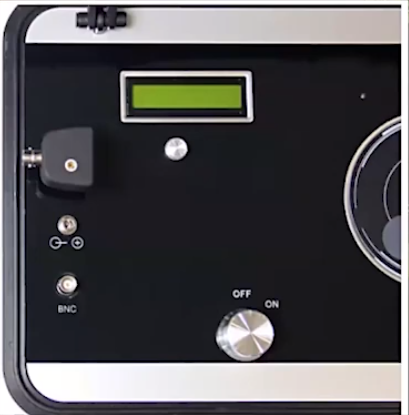
- Connect Scalar Digitizer: Connect the Scalar Digitizer to the link cable port on the Spooky2 Scalar Transmitter.
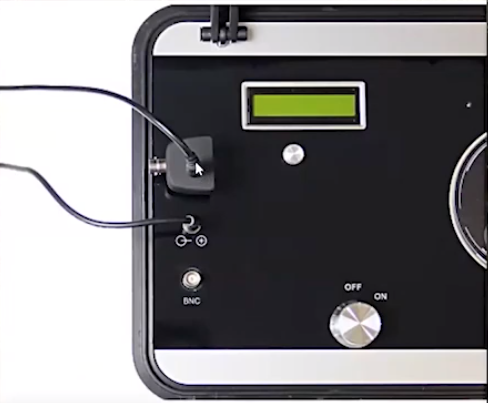
- Connect the Power and Link Cables: Connect both the link cable and power cable of the Spooky2 Scalar to ensure proper power supply and connection.
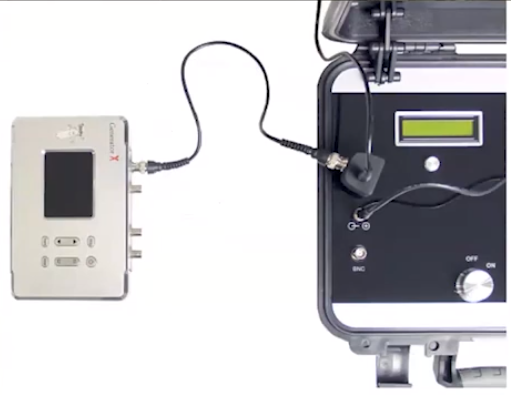
- Connect GeneratorX (G1): Connect G1 Out 1 from the GeneratorX to the BNC port of the Scalar Digitizer (Master connection).
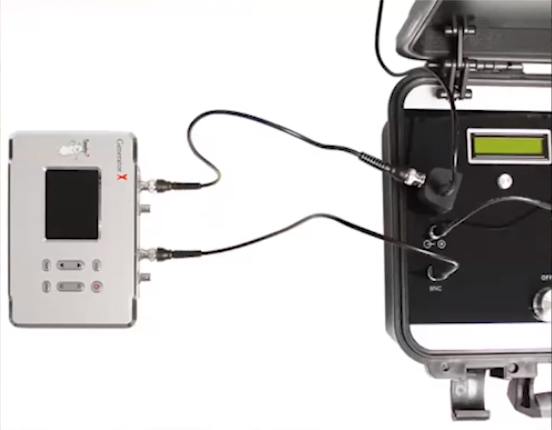
- Connect GeneratorX (G2): Connect G2 Out 1 from the GeneratorX to the BNC port of the Spooky2 Scalar Transmitter (Slave connection).
- Connect GeneratorX to the Computer: Connect the GeneratorX to your computer via the appropriate cable. Then, short press the Power button to turn it on.
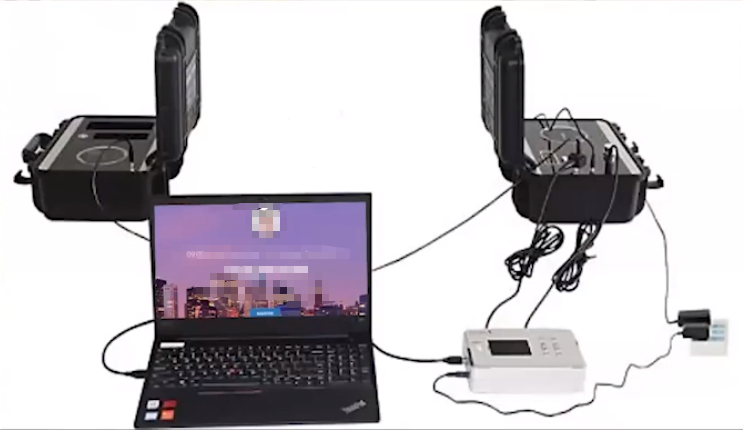
- Ensure Proper Positioning: Position the GeneratorX at least 1 meter away from the Spooky2 Scalar Transmitter and 1 meter away from the scalar field to avoid interference.

Software Setup
- Launch Spooky2 Software: Open the Spooky2 Software and ensure the system is properly initialized.
- Note the Port Numbers: Take note of the corresponding port numbers for G1 and G2 displayed on the GeneratorX interface.
- Select the Preset for G2: In the software, select the Spooky2 Scalar Digitizer Slave preset and configure it according to the corresponding port number for G2.
- Load the Preset for G1: Use the Spooky2 Scalar Digitizer Master preset for G1 and load the settings accordingly.
- Position Yourself Between the Scalar Units: Finally, position yourself between the Scalar Transmitter and Receiver to ensure the correct energetic field is generated for the scan.
- Start the Scan: Once everything is set up, the software will begin the scalar biofeedback scan, analyzing the body’s response to the scalar frequencies.
With these steps, you’re ready to conduct a scalar biofeedback scan to detect and address energy imbalances in your body.
What to Do After You Get Results from Scalar Scan
Once the scalar scan is complete, the software will display the HITS (frequencies that the body absorbs most effectively). These frequencies are key to restoring energy balance and promoting healing.
1. Save and Run Programs
- Save Results: After the scan, save the identified frequencies as a program.
- Run Later: You can run these saved programs using Spooky2 Scalar or any compatible device, targeting the imbalances detected in your body.
2. Targeted Healing
- Address Specific Concerns: Apply the frequencies to specific issues such as:
- Pain Relief: Target areas experiencing discomfort.
- Emotional Balance: Address emotional imbalances.
- Cellular Regeneration: Promote healing at the cellular level.
3. Running the Scan Results
- Select a Preset: Use the Spooky Scalar General (SS) – JW preset or another preset (if not using scalar).
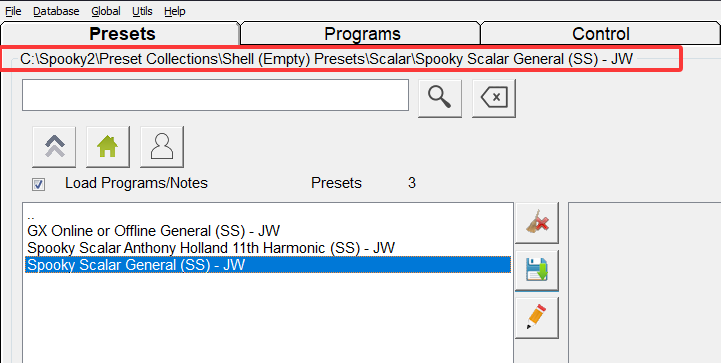
- Load Program: Go to the Programs tab, search for your saved scan results, and double-click to load them.
- Control Settings: In the Control tab, tick Overwrite Generator, select G2, and press Start.
- Start the Program: The channel button will turn green, indicating the program is running.
By following these steps, you can apply the frequencies from your scalar biofeedback scan to restore energetic balance and support healing.
Spooky2 Scalar Online Training Course – Scalar Scan
There are lots of questions and answers from this training course. Please click here to check the details of the Q&A.
Conclusion
Spooky2 Scalar biofeedback scanning offers a cutting-edge, non-invasive method to identify and address energetic imbalances in the body. By utilizing scalar energy, it provides personalized healing frequencies that support both physical and emotional health.
Whether targeting specific concerns or enhancing overall wellness, scalar biofeedback empowers you to restore balance and vitality. With simple hardware setup, scanning, and applying the results, Spooky2 Scalar helps unlock your body’s natural healing potential, offering a transformative approach to health and well-being.
