

People may wish to experiment with different frequencies. During the course of the experiment they may try several hundred different frequencies. It is time-consuming to edit, save and subsequently reload a database program prior to each test.
It is possible to set Spooky to run at a user-defined frequency without the need to alter the database.
1. Search for and load Pause 1 Hour CUST.
2. Select Follow Out 1.
3. Let’s say we wish to experiment with 121,200Hz. Make these settings for Out 2:
Out 2 – (Out 1 x 0) + 121200 with Hz unticked
4. Place a tick in the Swap Frequencies + Amplitudes for Out 1 and Out 2 box.
When you run the Channel, 121,200Hz will be transmitted on Out 1, and 0Hz on Out 2.
For August 2016 Software and above:


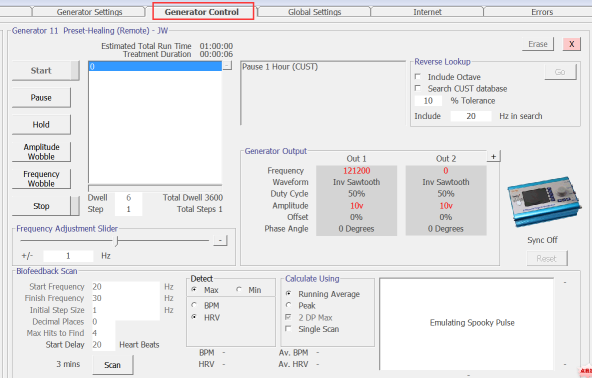
For July 2016 software and below:


Source: http://www.spooky2.com/forums/viewtopic.php?f=5&t=5474

Do you have an uptodate version for creating a single frequency
Hi, great question!
Yes, you can easily create and run a single frequency on Spooky2 without editing the database program each time. Here’s the updated method:
Load the preset: Pause 1 Hour CUST.
In the Settings tab, select Follow Out 1.
To run a specific frequency (e.g., 121200 Hz), go to Out 2 and set:
Out 2 = (Out 1 x 0) + 121200
Make sure the Hz box is unticked.
Tick the box for Swap Frequencies + Amplitudes for Out 1 and Out 2.
This lets you run any user-defined frequency without needing to reload or edit database presets each time.
Want to explore more? Download the DH Experimental Presets here:
https://www.spooky2.com/downloadspage/?utm_medium=chat&utm_campaign=link-shared-in-chat&utm_source=livechat.com&utm_content=www.spooky2-mall.com
If you need help setting it up, feel free to message us directly. Happy experimenting!