

Have you just finished a CT scan, X-ray, or ultrasound and felt unsure about what to do next? Many people feel anxious after imaging procedures—especially when they’re told to wait for results, or when something “uncertain” shows up on the scan.
If that’s where you are right now, know that you’re not alone—and that there are gentle ways to support your body while you wait. Spooky2 offers non-invasive frequency programs that many people use to help ease discomfort, promote healing, or support detox after imaging procedures. In this guide, we’ll show you exactly how to use it—step by step, with calm and clarity.
Step 1: Understand What Your Body Might Need After a Scan
After a CT scan, X-ray, or ultrasound, it’s common to feel a bit uneasy—physically or emotionally. Even if the procedure went smoothly, your body may still be processing radiation, contrast dye, or emotional stress. Taking care of yourself during this time doesn’t have to be complicated. Many people find comfort in combining gentle frequency support, rest, and hydration to help their body settle and recover.
Here are some common post-scan needs and the specific Spooky2 programs that may support each area:
| What Your Body May Need | Spooky2 Program Names (in Software) |
|---|---|
| Radiation exposure (CT/X-ray) | – Radiation Detox (ETDF) – DNA Repair (CAFL) |
| Tissue stress or inflammation | – Healing and Regeneration (BIO) – Pain and Inflammation Basic (BIO) |
| Lymphatic drainage / detox (especially after contrast dye) | – Lymphatic Diseases (ETDF) |
| Immune support | – Immune System Stimulation 1 /2/4(XTRA) – Immune System Stimulation 3 (PROV) |
| Emotional support or sleep | – Emotional Ties to Diseases (CAFL) – Emotions and Sleep 1 / 2 / 3 (XTRA) – Sleep Disorder (Insomnia) (ETDF) – Essential Oil – Joy (XTRA) |
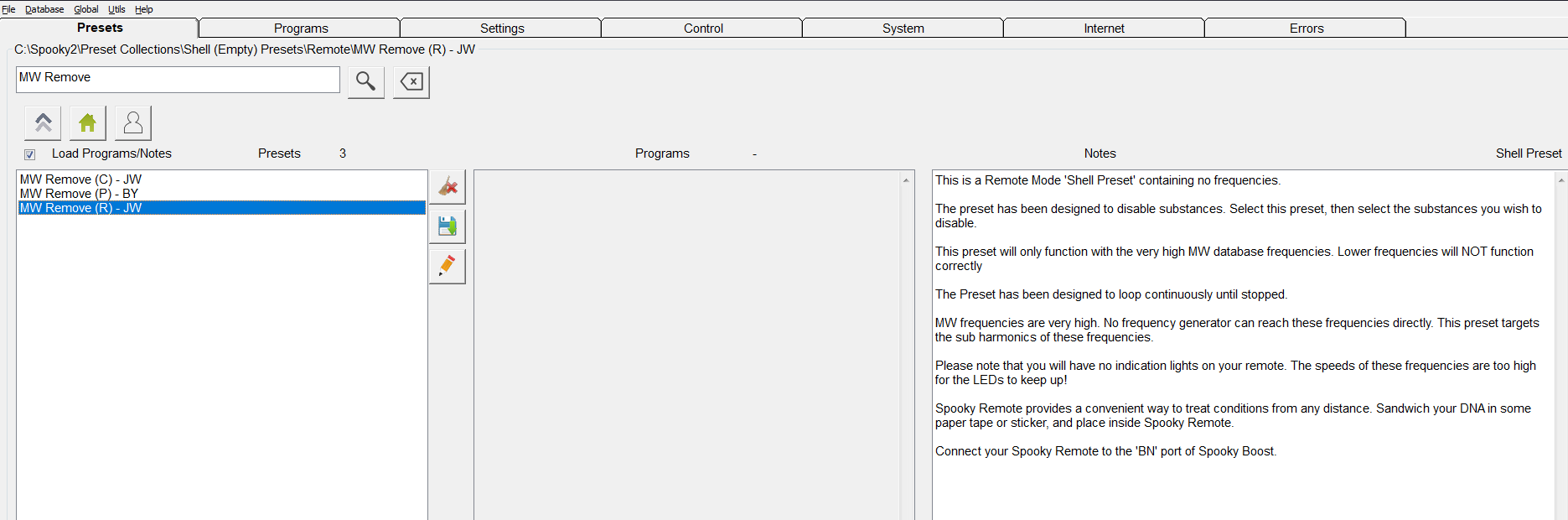
💡 If contrast dye was used during your scan, you can support your body by running a matching detox frequency. In the Spooky2 software, go to the Preset Tab and follow this path: Preset Collections > Shell (Empty) Presets > Remote > MW Remove (R) – JW
Then, in the Programs Tab, search for and select the specific dye used during your scan—such as Iohexol or Iopamidol.
Some users also choose to run gentle detox presets like “Detox Maintenance (R) – JK” to support recovery without strong reactions.
Drink plenty of water, rest when you need to, and take things slowly. Your body heals better when you give it space and kindness.
Step 2: Choose the Right Treatment Mode
Once you’ve identified the programs that may support your recovery, the next step is choosing how to deliver those frequencies to your body. Spooky2 offers several treatment modes. Each has its strengths, and there’s no “one-size-fits-all.” You can start with what feels easiest and build from there.
Here’s a quick guide to help you choose the right mode based on your needs:
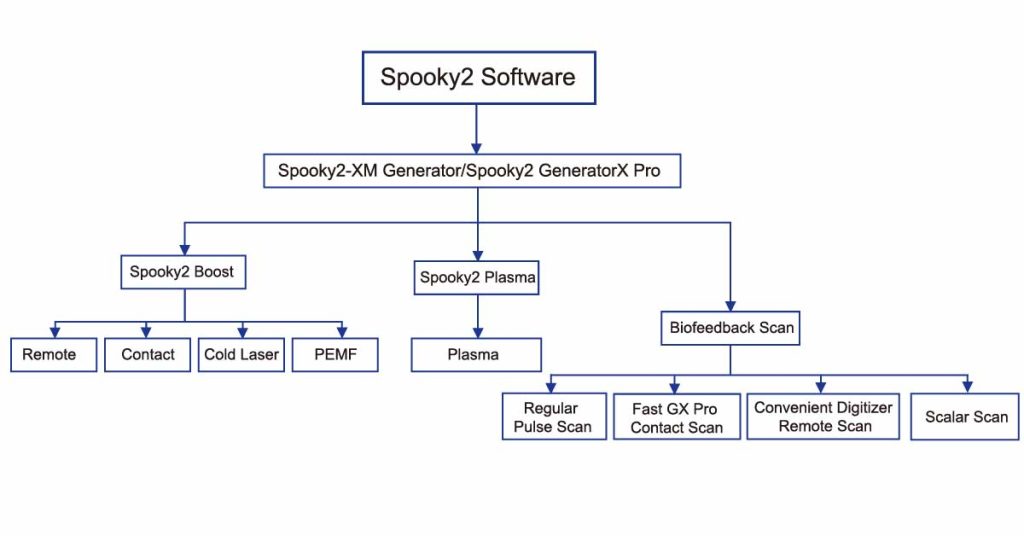
- Remote – Best for gentle, all-day support. You can run it while you sleep, work, or relax. A great starting point for beginners.
- Contact – Helpful for targeted healing or detox. You hold or attach electrodes to your hands or feet. Works well for inflammation or when you want a stronger effect.
- Plasma – Reaches your whole body deeply. Often used for long-term or more serious concerns. Requires more setup but offers strong support.
- Ultrasonic – Good for reaching deep organs like the lungs, liver, or bones. Useful if your scan involved internal areas.
- PEMF / Cold Laser – Ideal for sore muscles, joints, or nerves. Gentle and focused—great for smaller areas of discomfort.
💡 You don’t have to use every mode. Just start with what you have and what feels comfortable right now. It’s also perfectly fine to rest between sessions. Supporting your body is not about doing more, but doing what feels right at your pace.
Step 3: How to Run Your Program Safely and Effectively
Once you’ve identified the Spooky2 programs that may help after your scan, the next question is often: “How do I run these frequencies the right way?” This step is especially important for new users who may be concerned about doing something wrong—or doing too much.
This section will walk you through how to run your selected programs in a way that’s simple, thoughtful, and supportive of your body’s current state.
In Spooky2, every session starts with choosing a Preset, which defines how the frequency will be delivered (e.g., Remote, Contact, Plasma).
Here’s a basic setup example:
- Go to Preset Tab
→Preset Collections > Shell (Empty) Presets > Remote > Healing (R) – JW - Go to Programs Tab
→ Search and select your desired program (e.g.,Radiation Detox (ETDF)) - Go to Control Tab
→ TickOverwrite Generator
→ Select your generator and clickStart
Tip: Many issues happen when users skip the Preset step or forget to tick “Overwrite Generator.” Slow down, and follow the order step-by-step.
After a scan, your body is already processing a lot: radiation, contrast agents, possible inflammation, and emotional tension. It’s best to start small—both in terms of how many programs you run and how long each session lasts.
Here’s a sample weekly layout that reflects common practices shared by members of the Spooky2 Facebook group. Please note: this is not a one-size-fits-all solution, but rather a reference to help you get started. Your personal condition and energy level may require adjustments.
- Day 1–2: Run only foundational detox support such as
Radiation Detox (ETDF)or a matchingMW Removeprogram (e.g., Iohexol, Iopamidol) - Day 3–5: Add an immune or tissue repair layer, like
Immune System Stimulation 1 (XTRA)orHealing and Regeneration (BIO) - Day 6–7: If you’re feeling mentally or emotionally unsettled, add gentle emotional balancing programs such as
Emotions and Sleep 1 (XTRA)orEssential Oil – Joy (XTRA)
Recommended time per session: 1–3 hours for Remote mode is gentle enough. For Contact or Plasma, 30–60 minutes may be better to start.
If you’re unsure which programs to run—or you’ve tried several but don’t feel much change—Biofeedback Scanning can help identify what your body needs most right now.
Think of it as asking your body directly: “Where do you need support the most?”
Many Spooky2 users rely on bio scans when dealing with lingering symptoms or when they want to fine-tune their healing process. Here’s an example from the Spooky2 Facebook group:
User feedback: “After my CT scan, I ran a GX scan and found frequencies pointing to lymph stagnation and gut stress. I used the top results + MW Remove, and I felt lighter by Day 3.”
Biofeedback is not required, but it can be a powerful next step—especially if you’re dealing with complex issues or slow recovery.
Want to learn more about biofeedback? Check out these helpful guides:
Frequencies work subtly for many people. You may not feel anything dramatic—but that doesn’t mean nothing is happening.
Watch for signs like:
- Deeper sleep
- Emotional release
- Less fatigue or fog
- Improved digestion
- Reduced swelling or pain
If you feel unwell during or after sessions (e.g., nausea, headaches, fatigue), that might be a Herxheimer reaction—a sign your body is detoxing.
In that case:
- Pause or reduce session time
- Drink more water
Frequency healing is a process, not a race. The goal isn’t to “fix everything” overnight—but to give your body supportive signals and space to respond in its own time.
Conclusion
Medical scans can leave more than just images behind—they can stir up worry, fatigue, or subtle imbalances in your body. But with the right support, recovery doesn’t have to feel overwhelming. Spooky2 offers a quiet way to help your body settle after a scan. Whether you’re easing inflammation, supporting detox, or calming anxious thoughts, gentle frequency programs—combined with rest and hydration—can help you move forward at your own pace.
Remember: you don’t need to do everything at once. Start with a few simple programs. Listen to your body. Adjust if something feels too strong. Healing isn’t about pushing—it’s about creating the conditions where your body can respond. And if you ever feel uncertain, you’re not alone. Thousands of users around the world are learning, sharing, and healing—one quiet session at a time.
