


It’s an open, user-tested method—designed by someone who simply wanted to feel better. Here’s how Robert does it:
Step 1: Install the Preset
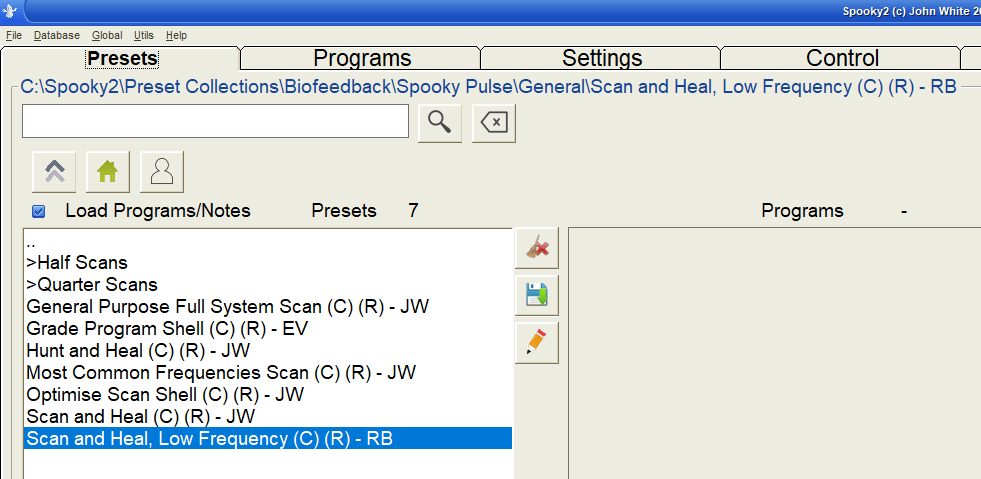
- Locate the Preset. It’s in the folder at C:\Spooky2\Preset Collections\Biofeedback\Spooky Pulse\General. If the preset is not in this folder, you can update your Spooky2 presets with version 20250910 from this link: https://www.spooky2.com/downloadspage/
Step 2: Prepare Your Hardware
- Use the Pulse sensor
- Run both scan and treatment in Remote mode
- Contact mode is not required and often unnecessary
This method requires the use of the Spooky2 Pulse to detect your heartbeat during the scan. If you do not have the Pulse accessory, you will need to obtain one.
Step 3: Set the Scan Parameters
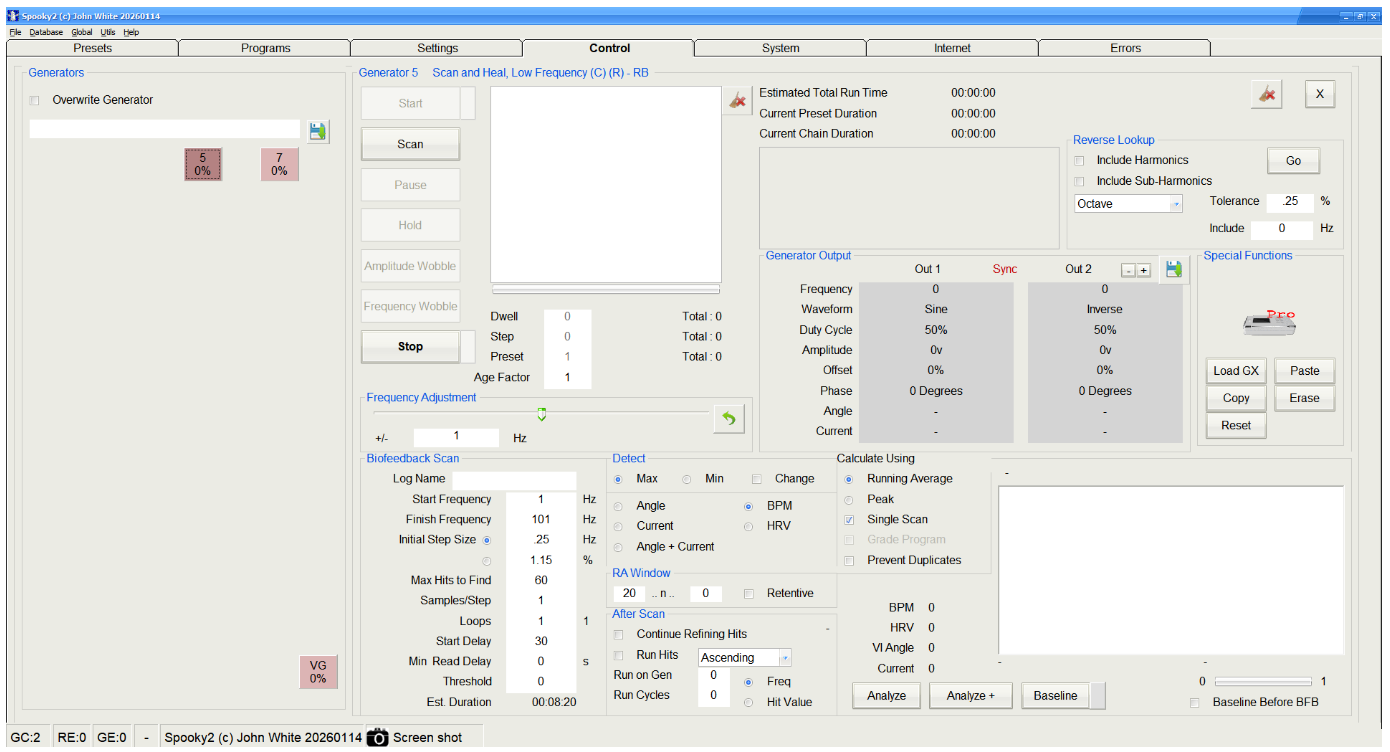
- Start frequency: 1 Hz
- End frequency: 100 Hz
- Step size: 0.5 Hz
- Max hits: 40 (A 1-hour treatment time with dual output remote)
- Waveform: Use a sine wave for clean signals
- While running the BioScan, you must keep the Pulse sensor attached to your finger or ear. A .5 Hz step size scan runs for about five minutes. After the scan finishes, you can remove the Pulse sensor and run your reverse lookup.
Step 4: Run the Scan
- Make sure advanced features are enabled
- Rescan your devices if needed before starting
- Let the scan run completely
Step 5: Analyze the Results
- Use Reverse Lookup to see what each frequency might relate to (e.g., liver, nervous system, lymph)
- Decide whether or not to include harmonics
- Save the scan log before closing Spooky2
- Compare results to your known health history
- Keep all frequencies, even if no database match—especially if repeated in multiple scans
Step 6: Build Your Healing Program – Please watch the videos and read the video descriptions for all of the details!
- Create a new BFB program using your scan results
- Set dwell time to 1 second for easy future editing
- Create your personal preset using the “Healing (R) – JW” shell, use the dual output option, (or the Healing (Dual) (R) – JW), amplitude 20 volts
- Set the dwell to 180 seconds (using the Chain Editor) to create a standardized program
- Chain it to run 3 times in a row, followed by a detox or anti-aging preset (up to 1 hour)

Am I corrrect to assume he used a genx?
Hi Allan! I can confirm the author in the blog was using XM kits, not a GeneratorX (GenX). In fact, over time they purchased several XM Remote Kits along with contact mode accessories, XM biofeedback accessories, and a colloidal silver kit—so their setup is very close to a full XM Essential Kit.
First of all, a huge thank you to Robert for sharing his work! I send a “WELL DONE!” cheer to him. Acting on a subtle, innovative idea from our Higher Self (as with this healing method) and staying the course until it comes into form and proves itself is a service to all, and noteworthy in the action.
QUESTION: Are there any changes in the instruction when using a GenXP? Do you need to use the Pulse? Are there any other differences that I would need to know, as I will be using the GenX
Thank you
This is a PULSE shell and the Pulse must be used. It is not designed for anything else.
Yes, use the Pulse.
The modified GenX preset is coming soon, and the PDF linked in this article will be updated with all of the details. The new materials should be available in February 2026.
has the instructions been updated yet? thanks
Hi. Please check the document https://www.spooky2-mall.com/resources/Healing-BioScan-Tips.pdf The scan preset for Sample Digitizer is now available in the software.
Is there any entries in spooky2 forums on this treatment. I just did a 1-20Hz scan and run
Hello Gordon, here is the direct link to the post of forum: https://www.spooky2.com/forums/viewtopic.php?t=18479
Thanks for posting the forum link, very timely and much appreciated.
The YouTube video and description provide the most current, accurate information on this topic.
I would like to express my gratitude to Ana Gu and the Blog team for the work they have done to share my story and my work with Spooky2 users. I deeply appreciate what they have done to implement the edits and corrections that I have provided to Ana. The result is a page with clear, easy-to-understand instructions and a downloadable Preset that will enable Spooky2 users to obtain the deep level of healing they need. John White’s understanding of quantum entanglement has brought the healing art to a whole new level. The inexpensive XM generator technology designed by John, with the ability to both scan and provide healing support for the body, has made my discoveries possible. Feedback from individuals who have used the initial prototype has been invaluable for the project development. I appreciate what all of you have done, as it has brought a deeper level of meaning and purpose to my life.
Was bedeuten die + und – Ergebnisse? Über-Unterfunktion bzw. Über-Unter Energie (wie Meridiane?)?
Hi. If you mean the frequency adjustment slider in the Control tab, it allows you to adjust the frequency that’s currently running, up or down. The amount by which you can adjust is set below. Usually, if you’re running presets from the library, you don’t have to make changes in this section.
What do you do if the remote does not work for you? Can this be run with contact?
Hi Michele. Yes, you certainly can run your results in Contact mode. The point of using Remote mode is to provide continuous support and sufficient repeat cycles in a day without being tethered to a machine. You can combine Contact and Remote treatment and see if it works better for you.