
Listening to Your Body Through Frequencies
Every cell, organ, and system in your body vibrates with its own rhythm. When that rhythm falls out of tune, discomfort or disease can appear. Spooky2 Biofeedback scanning offers a fascinating way to listen to these subtle signals—helping you identify the frequencies your body needs to restore balance.
Dr. Siddheshwar Chopra, a Ph.D. in Experimental Physics and India’s first certified Spooky2 Rife Trainer, combines science and holistic healing in his teaching. Drawing from his nanoscience background, he describes Biofeedback as a bridge between physics and biology—where the body itself reveals what it needs.
The Science Behind Biofeedback: Resonance in Action
Biofeedback scanning is based on the principle of resonance. Every organism, including pathogens, has a natural resonant frequency. When you expose it to its matching frequency, it vibrates intensely—just like how a specific musical note can shatter glass.
Spooky2 Biofeedback measures how your body reacts to sweeping frequency signals. When a frequency “hits” a stressed area, your body’s electrical behavior—such as skin conductivity, heart rate, or current phase angle—shifts slightly. The system detects and records those responses.
Dr. Chopra explains: “Current flow is like a river. When the terrain changes, the flow changes—that’s how your body tells us where the disturbance is.”
📊 Comparison of Spooky2 Biofeedback Measurement Methods
| Biofeedback Type | Data Measured | Best For | Example Device |
|---|---|---|---|
| Pulse Scan | Heart rate | Whole-body scan | Spooky2 Pulse |
| GX/X Pro Scan | Current & phase angle | Local issues | GeneratorX / X Pro |
| Sample Digitizer | DNA samples | Remote scanning | Sample Digitizer |
| Scalar Digitizer | Field resonance | Energy body | Spooky2 Scalar |
Three Ways to Discover What Your Body Responds to Most
1️⃣ Personal Scan – Your Body’s First Voice
The Personal Scan performs a full frequency sweep and records the top 10 strongest reactions.
Ideal for general assessment or when you’re unsure where to start.
- Recommended preset: General Biofeedback Scan
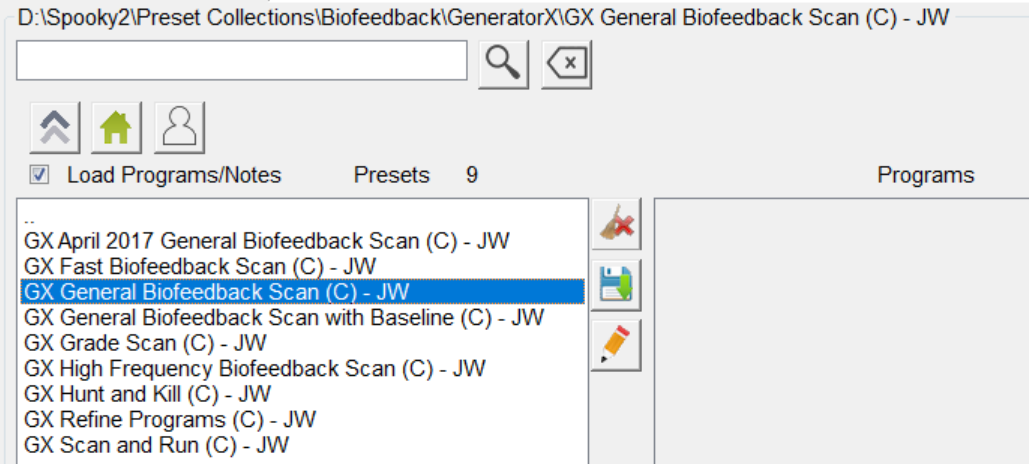
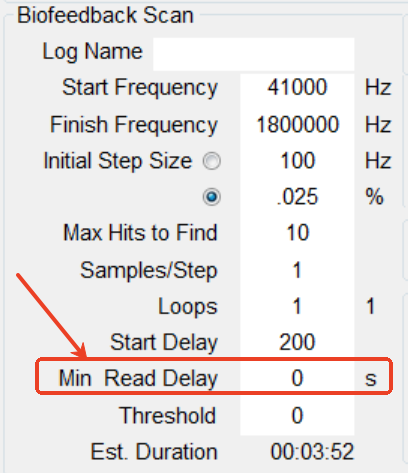
- Tip: Set Minimum Read Delay to 0 or 0.01 for faster scans
- Result: A snapshot of your body’s frequency needs at this exact moment
“Each scan is like capturing your body’s energetic fingerprint,” says Dr. Chopra.
2️⃣ Grade Scan – Ranking Frequencies by Effectiveness
If you have multiple programs for the same issue, the Grade Scan helps you identify which ones work best for your body. 🔍 Learn more in our detailed guide: How to Do a Grade Scan
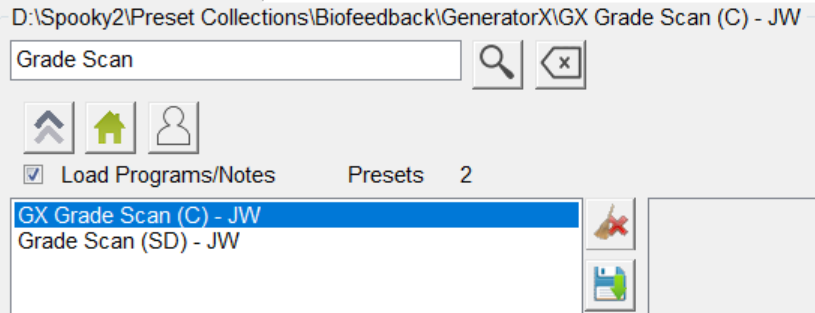
It sorts frequencies from strongest to weakest biological response, assigning each a grade number.
Values above 1.0 indicate the most significant reactions.
- Use for pathogen-related programs only
- Avoid using with healing or detox sets
- Fast to run—usually just a few seconds
“Grade Scan helps you focus your energy where it truly matters,” Dr. Chopra explains.
3️⃣ Refine (Optimize) Scan – Precision at a Microscopic Level
Once key frequencies are found, the Refine Scan fine-tunes them by sweeping slightly above and below each value—down to two decimal places. 🔍 For a detailed tutorial, see: How to Do an Optimized Scan
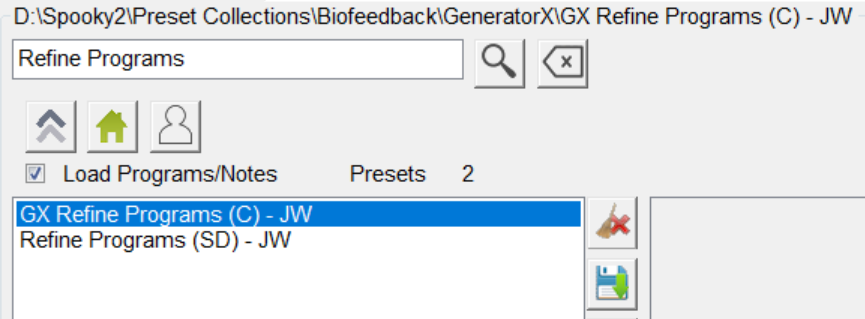
It’s like adjusting the focus on a microscope: you already know where to look; now you’re sharpening the clarity.
- Works only with pathogen or killing programs
- Enhances targeting accuracy
- Provides decimal-level precision (e.g., 880.23 Hz → 880.27 Hz)
From Scan to Therapy: Turning Data into Healing
Once you save your scan results, load them as a custom program under a Killing Preset and run them via Contact, Remote, or Plasma modes.
- Each frequency runs about 3 minutes
- Ten frequencies ≈ 30-minute session
- Follow with Detox or Terrain presets to support cleansing
Amplitude & Frequency Wobble Explained
- Amplitude Wobble = changing voltage → like adjusting the dosage of the frequency.
- Frequency Wobble = slightly shifting the tone → helps target mutating pathogens.
“Pathogens evolve,” says Dr. Chopra. “Frequency wobbling keeps you in tune with their changes.”
Reverse Lookup: Finding Meaning Behind Frequencies
Spooky2’s Reverse Lookup compares your scan’s frequencies with known databases of pathogens, systems, and substances.
It’s not diagnostic—but can provide valuable clues.
Best Practice Tips:
- Start with 0.0125% tolerance, increase slowly
- Enable Include Harmonics / Subharmonics for broader matching
- Use Octave as harmonic type (default setting)
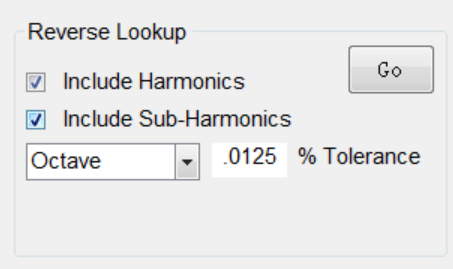
💡 Note: Harmonics act like echoes—500 Hz may relate to 250 Hz or 1000 Hz versions of the same signal.

Common Questions from Users
Why do results differ each time?
Because your body’s energetic condition changes daily—hydration, stress, and environment all influence response.Can I transfer results to another computer?
Yes. Copy the file BFB_Frequencies.csv from your Spooky2 folder and paste it into the same path on another computer.Can Biofeedback detect emotions or chakras?
Possibly—enable Subharmonics to explore lower-frequency ranges associated with subtle energy fields.Is it dangerous if I set something wrong?
No. “The worst that happens is nothing happens,” Dr. Chopra reassures. “You can’t harm yourself with your own stress frequencies.”
A Bridge Between Science and Self-Healing
Dr. Chopra views Biofeedback as “the dialogue between physics and consciousness.” The Spooky2 system measures what the body already knows, translating that wisdom into precise, actionable frequencies.
By combining scientific insight with patient observation, users can better understand their internal patterns and support their body’s natural healing intelligence.
“Biofeedback is not just about killing pathogens,” Dr. Chopra concludes. “It’s about learning to listen—to the signals, the shifts, and the silence within your own body.”
Recommended Reading:
- The Complete Biofeedback Scan Guide for Spooky2 Users
- How Spooky2 Biofeedback Scans Optimize Your Healing Journey
- Maximizing Biofeedback Accuracy with Spooky2’s Baseline
🎥 For a deeper understanding, explore Dr. Siddheshwar Chopra’s full course on how Spooky2 Biofeedback reveals your body’s hidden frequency patterns:

The personal scan section says that you can use the sample digitizer to do a remote full body scan via DNA. Most other Spooky2 documentation states that the GX based Biofeedback scan can only detect Pathogens (not “what your body needs”). Also Spooky2 documentation also states that a Sample Digitizer scan only detects pathogens in the sample. Please explain the discrepancies between this article and the other documentation.
Hello Michael, thank you for your question.
In the blog, the phrase “what your body truly needs” was meant in a broader, supportive sense — referring to which frequencies your system reacts most strongly to, not a diagnostic assessment of organs, emotions, or nutrition.
We truly appreciate you pointing this out — based on your feedback, we’ve already updated the blog wording to make this clearer and more aligned with official documentation.