

Spooky2 offers four primary biofeedback scanning methods: pulse scan, GeneratorX contact mode scan, Sample Digitizer scan, and Scalar Digitizer scan. This article provides a comprehensive guide to performing a Sample Digitizer scan with a Spooky2 GeneratorX Pro.
How It Works
Spooky2 Sample Digitizer can be used for direct scanning of biological samples (urine, saliva, blood, etc.). You are not required to be connected by wires. The results (or frequency “hits”) are representative due to the high ratio of pathogens within the sample.
Hardware Requirements
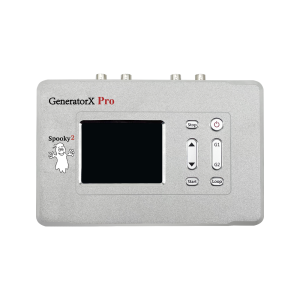
1 Windows system laptop, 1 Spooky2 GeneratorX Pro, 1 Spooky2 Sample Digitizer, fresh biological sample (urine, saliva, blood, nail powder, etc)
Step-by-Step Operation
Hardware Connection
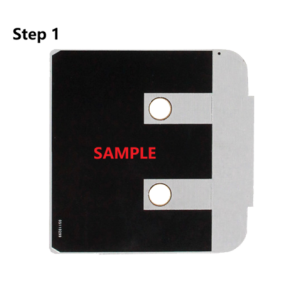
Step 1: Place the biological sample on the black “E” of the two plates that come with the Sample Digitizer. Then put the two plates together (two black “E”s facing each other, black side with a metal strip facing out). Make sure there is no gap between the two plates.
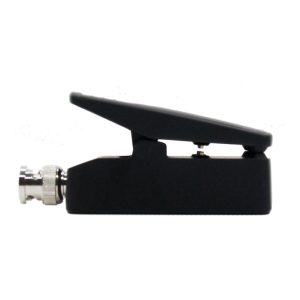
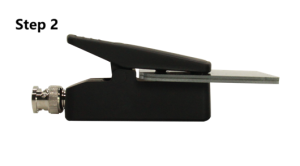
Step 2: Clip the two plates to the Sample Digitizer. Make sure the black dots of the Sample Digitizer fit into the small holes in the plates, and that the metal strips of the plates are in contact with the metal touch points of the Sample Digitizer.
Step 3: Connect the Sample Digitizer directly to the Out1 port of the Generator.
Step 4: Connect the Generator to the computer’s USB port and the 12V power supply. Turn on the Generator.
Software Operation
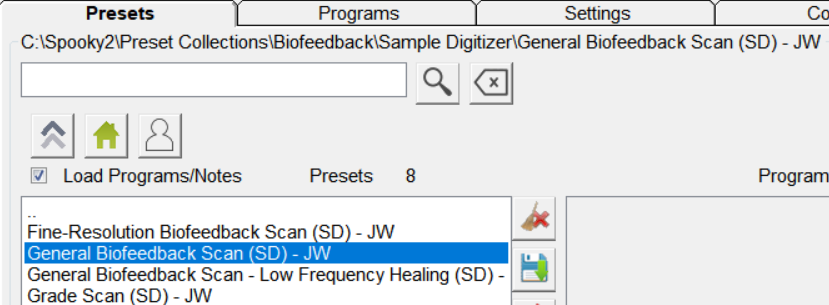
Step 1: Launch the Spooky2 Software. Go to the Presets tab. Select >Biofeedback>Sample Digitizer>General Biofeedback Scan (SD) – JW
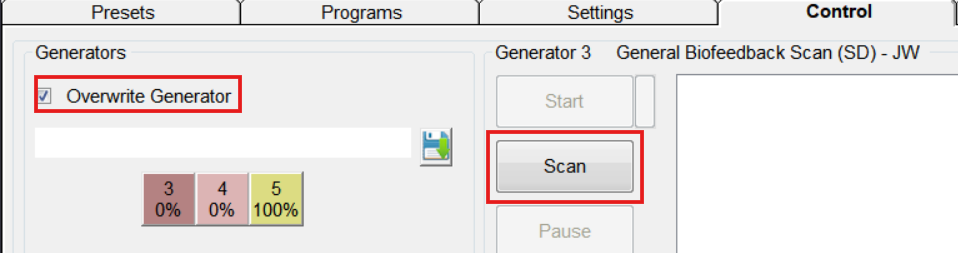
Step 2: Go to the Control tab. Tick Overwrite Generator. Choose the corresponding port number to load the preset. Click on Scan to start.
Step 3: When the scan completes, your scan results will pop out in a new window. You can save the results and run them afterwards. Read more on what to do with your scan results here https://www.spooky2-mall.com/blog/what-to-do-with-spooky2-biofeedback-scan-results/
For video demonstration, please visit https://www.youtube.com/watch?v=T4nzmA1glKU
Tips
- Stop all other treatments when doing a biofeedback scan. Do not run other programs on the same generator during the scan.
- Acceptable biological samples include saliva, urine, blood and nail powder. Wet samples last less than 8 hours while dry samples can last longer. Do NOT add moisture or liquids to dry samples.
- Use a sufficient amount of your sample to cover the “E”. But do not overfill the area. Excessive samples may spill over or prevent the two plates from touching each other.
- Spooky2 Sample Digitizer is designed exclusively for analyzing the sample itself. For a comprehensive full-body scan, TENS contact scan remains the recommended method.
- It is recommended to gently clean the surface of the plates with alcohol wipes.
Disclaimer: Spooky2 biofeedback scan is not a substitute for medical diagnosis. Reverse lookup results are for informational purposes and do not indicate the presence of actual medical conditions.
Frequently Asked Questions
How long does a Sample Digitizer scan take?
A standard Sample Digitizer scan usually takes approximately 40 minutes to complete.
Can I use an XM Generator to perform a Sample Digitizer scan?
No. Sample Digitizer is only compatible with Spooky2 GeneratorX (Pro).
Can I use a Spooky2 Remote for Sample Digitizer scans?
No. Spooky2 Remote is not designed for BFB scans and cannot provide sufficient valid feedback results.
Can I use a Sample Digitizer for remote treatment?
No. For remote treatment, you should use a Spooky2 Remote with fresh DNA samples.

When the scan is complete what is the output? Does it identify the pathogen?
Hi David. The scan is not intended for diagnostic purposes. However, it can indicate the frequencies to which your body shows the most significant responses. You can then run the scan results directly using the appropriate shell preset.