

Spooky2 offers four primary biofeedback scanning methods: pulse scan, GeneratorX contact mode scan (TENS scan), Sample Digitizer scan, and Scalar Digitizer scan. This article provides a comprehensive guide to performing a Scalar Digitizer scan with Spooky2 Scalar and Scalar Digitizer.
How It Works
Scalar Digitizer scan does not require physical contact or biological samples. Instead, the subject simply sits or lies comfortably within the scalar field. Using both G1 and G2 on your GenX Pro, the Slave preset modulates the scalar field through one generator port, while the Master preset measures the response (change in the scalar field) through the other port.
Hardware Requirements
1 Windows system laptop, 1 Spooky2 GeneratorX Pro, 1 set of Spooky2 Scalar, 1 Scalar Digitizer, and 2 BNC cables.
Recommended Kits
If you don’t have a GenX Pro or wish to add an extra GenX Pro for Scalar Digitizer scan, we recommend the Spooky2 Scalar GeneratorX Pro Essential Kit.
If you already have a GenX Pro and wish to expand your setup with Scalar Digitizer scan option, we recommend purchasing the Spooky2 Scalar kit & Scalar Digitizer.
Step-by-Step Operation
Hardware Connection
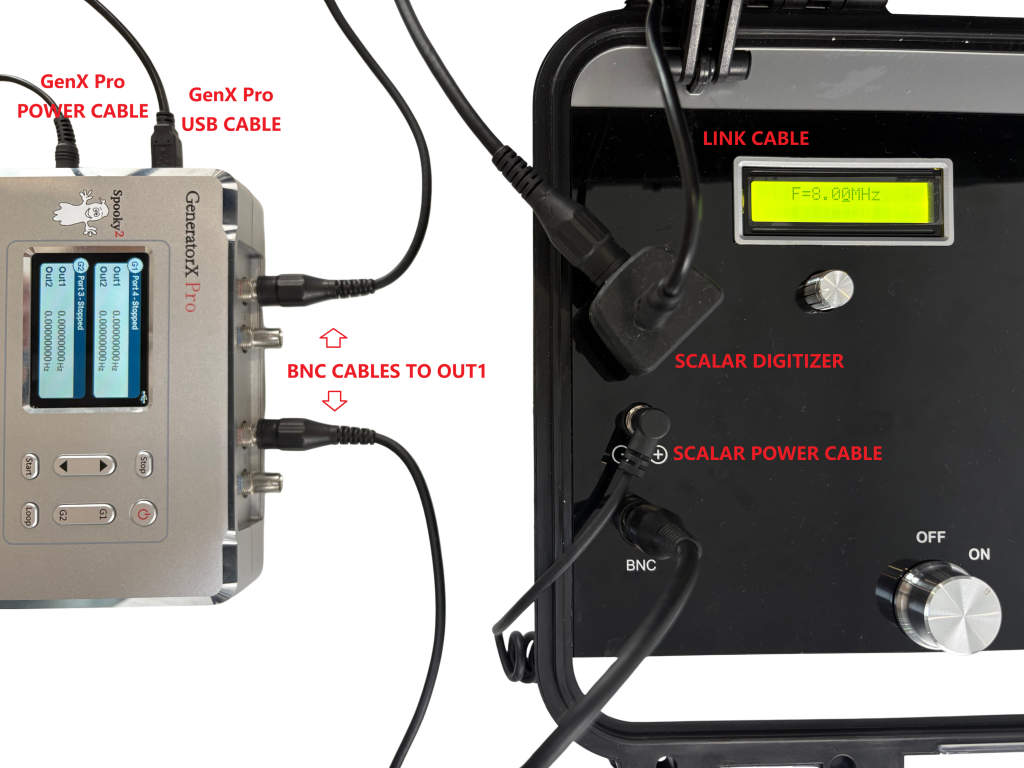
- Insert Scalar Digitizer into the link cable port on the Scalar Transmitter.
- Connect one end of the link cable to the top hole of the Scalar Digitizer, and the other to the link cable port on the Scalar Receiver.
- Connect the power cable of Spooky2 Scalar to the power port on the Scalar Transmitter.
- Use one BNC cable to connect G1 Out1 with the BNC port of Spooky2 Scalar Digitizer. Use the other BNC cable to connect G2 Out1 with the BNC port of the Spooky2 Scalar Transmitter.
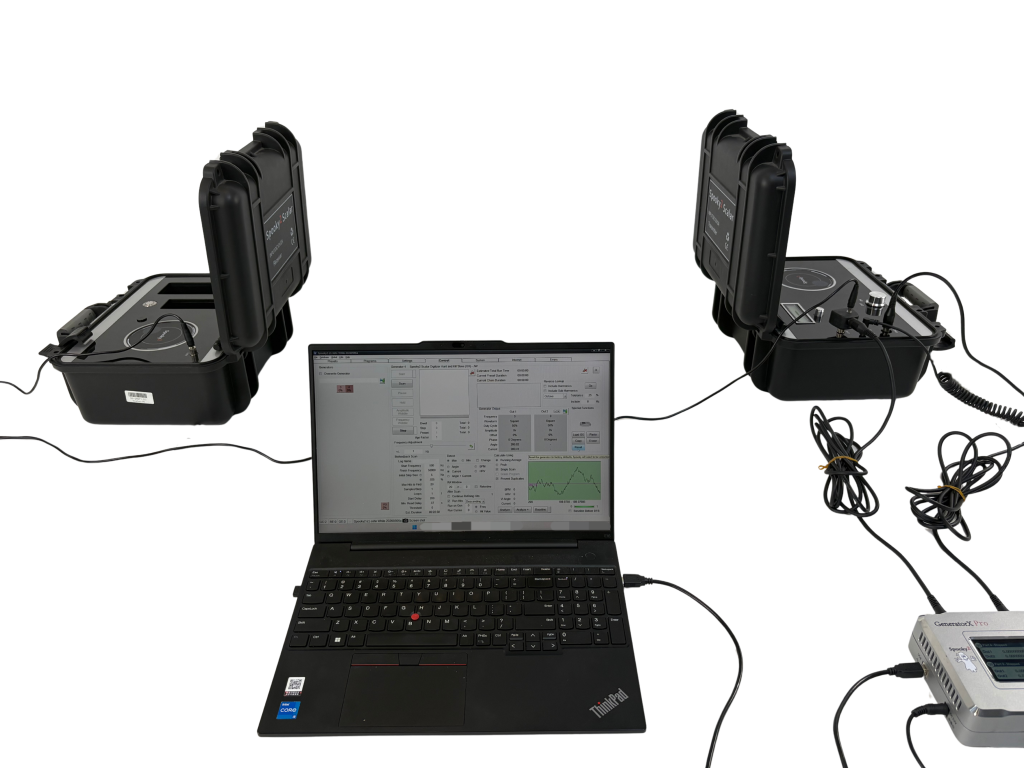
- Connect GenX Pro to the computer and turn it on. (Tip: Please keep the generator and the computer at least 1m away from both the Scalar Transmitter and the scalar field.)
- Tune the Spooky2 Scalar.
Tuning Tips
- Retune your Spooky2 Scalar with every use.
- To tune your Spooky2 Scalar, turn the tuning knob below the screen on your Transmitter box counterclockwise until the tuning light beside the transmitter coil reaches its first maximum brightness (approximately 5.6 to 5.8 MHz).
- It is normal that the receiver light goes off when a Scalar Digitizer is connected.
Software Operation
- Launch the Spooky2 software. Take a note of port numbers for G1 and G2.
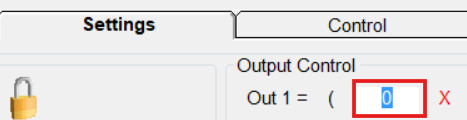
- Select the Spooky2 Scalar Digitizer Slave (GX) – JW preset. In the Output Control section in the Settings tab, set Out 1= [G1 Port Number]. Overwrite G2.
- Overwrite G1 with the Spooky2 Scalar Digitizer Master (GX) – JW preset. Hit the Scan button for G1 Master preset. G2 will start automatically to transmit frequencies, whereas G1 starts to record the responses.
- When the scan completes, your scan results will pop out in a new window. You can save the results and run them afterwards. Read more on what to do with your scan results here https://www.spooky2-mall.com/blog/what-to-do-with-spooky2-biofeedback-scan-results/
For video demonstration, please visit https://www.youtube.com/watch?v=tSKy0lC3hQg
Tips
- Stop all other treatments when doing a biofeedback scan.
- Do NOT use Scalar Digitizer scan if you have any electronic implant such as a pacemaker.
- During the scan, make sure there is only ONE person in the scalar field. Other living organisms should stay away from the scalar field during the scan to avoid any possible interference.
Frequently Asked Questions
Q: What are the differences between Scalar Digitizer scan and Scalar Digitizer Hunt and Kill?
A: A Scalar Digitizer scan measures minute fluctuations in the scalar field to identify frequency hits. Scalar Digitizer Hunt & Kill takes this a step further by adding an automated killing action. For more information on Scalar Digitizer Hunt and Kill, please read here.
Q: Can I perform other BFB scans in the scalar field?
A: No. Other BFB methods use different detection logic that is incompatible with Spooky2 Scalar. The Scalar Digitizer is the only BFB scan method designed for Spooky2 Scalar as it uses one GenX port to modulate the field and the other to record signal changes. Other methods would produce inaccurate results due to field interference.
Q: Can I perform a Scalar BFB scan with an XM generator?
A: No. Spooky2 Scalar Digitizer measures tiny changes in the scalar field including the phase angle, which cannot be achieved with an XM. For XM users, Spooky Pulse remains the standard BFB option.
Q: How long does a Scalar Digitizer scan take?
A: A standard Scalar Digitizer scan typically takes approximately 10 minutes to complete.
For more FAQs, please read here.
Discover Our Online Training Course
Spooky2 trainer Debbie Rich recently hosted an insightful training session on Spooky2 Scalar Digitizer scan. Watch the replay below to discover more.
