


Candida overgrowth might sound like something out of a horror movie, but for many, it’s a real and uncomfortable reality. Candida albicans, a troublesome fungus, typically exists in small quantities within our bodies. However, when it overgrows, it can lead to various health issues. Fortunately, there are ways to tackle it, including the innovative Spooky2 Rife machine, a powerful tool of frequency therapy.
The Cause of Candida Overgrowth
Candida overgrowth often occurs when the delicate balance of microorganisms in our body is disrupted. This disruption can be caused by factors such as:
- antibiotic use
- dietary factors
- weak immune system
- hormonal imbalance
Signs and Symptoms of Candida Overgrowth
Candida overgrowth can manifest in various ways, including:
- yeast infections
- oral thrush
- digestive issues
- fatigue
- skin problems

Home Remedies for Candida Overgrowth
While severe cases of Candida overgrowth may require medical intervention, there are several home remedies that can help manage symptoms and support the body’s natural balance:
1. Dietary changes
Adopting a low-sugar, low-carb diet can starve Candida and help restore balance to the gut.
2. Probiotics
Introducing probiotic-rich foods like yogurt or kefir can help replenish beneficial gut bacteria.
3. Antifungal herbs
Herbs such as garlic, oregano, and pau d’arco have natural antifungal properties and can help combat Candida overgrowth.
4. Stress management
Practices like meditation, yoga, or deep breathing exercises can help reduce stress, which may contribute to Candida overgrowth.

Spooky2 for Candida Overgrowth
Spooky2 is a cutting-edge frequency therapy system that utilizes the principles of bioresonance to target pathogens like Candida. It employs Rife frequencies to disrupt the cell walls of pathogens like Candida, effectively neutralizing them. It is noninvasive and can be used safely at home, making it an accessible option for those seeking relief from Candida overgrowth.
With Spooky2, you can choose from a variety of delivery methods, including contact, remote, or plasma, depending on your preferences and needs.
We recommend you use Remote for Candida overgrowth.
Hardware Preparation:
Software Operations:
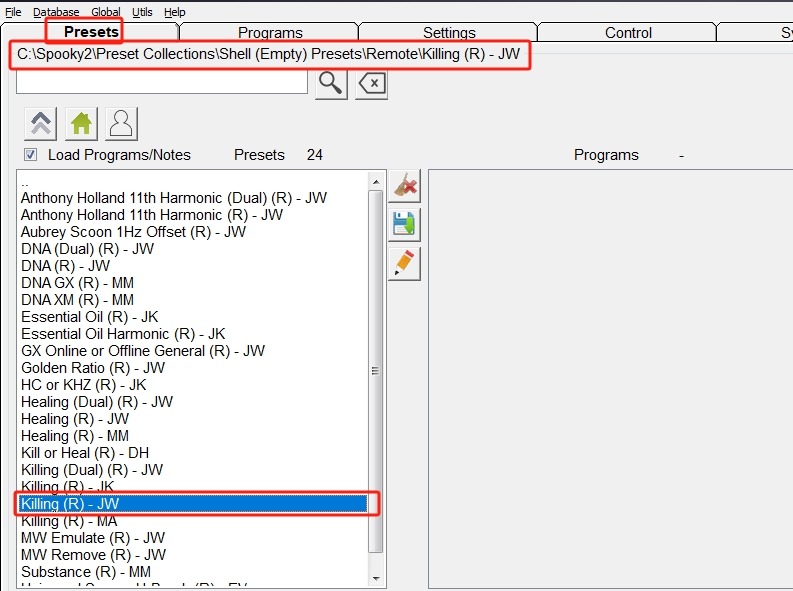
Step 1: Go to the Preset tab, and choose Shell (Empty) Presets > Remote > Killing (R) – JW.
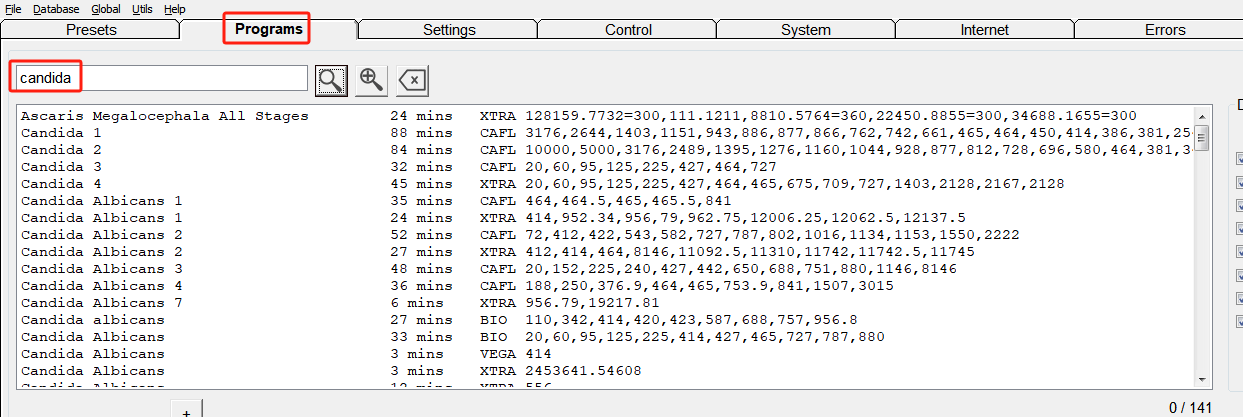
Step 2: Go to the Programs tab, search “candida” for relative programs, and choose the one(s) you want.
Step 3: Go to the Control tab, tick “Overwrite Generator”, choose your generator port, and click the “Start” button to begin.
User Testimonials
My Body Detoxify From Running Spooky2 Candida Frequencies

Spooky2 has been a Godsend! I have really enjoyed using it for myself and also with some of my friends who are willing to give it a go for their health troubles. I have had great results with running the candida frequencies. I could feel my body detoxifying from candida and have had much better digestion ever since. I think it is a great way to get rid of nasty microbes in the GI tract as well as helping in so many other ways. It opens up so many opportunities.
Conclusion
Candida overgrowth can be a challenging condition to manage, but with the right approach, it’s possible to find relief and restore balance to the body. Spooky2 can support your journey to better health and wellbeing. Take charge of your health today with Spooky2 Anniversary Portable GeneratorX Pro Remote Kit. Enjoy 9% OFF during our anniversary sale and get free gifts!


The problem with multiple programs is that users do not know which program to choose. Using the wrong frequency set can be treating the candida variant they do not have. Short of having a microbiological analysis done on any given sample the program choice can be hit and miss!
Can SP2 work out how user can test the candida sample to be treated so as to identify the candida strain they are contaminated with and then treatment protocols will be more effective.
BRBabic
Hi Branko, if you don’t know which program you should run, we recommend that you do a biofeedback scan. A biofeedback scan can help monitor your body and find the frequency that works best for you. Thank you very much for your suggestion, we will keep working on it. Feel free to contact us with questions at support@spooky2-mall.com.
Hallo Branko,
nimm den Grade Scan aus dem Preset Biofeedback
dann wähle die Candidaprogramme aus
dann scanne die Programme
Spooky zeigt dir welche Frequenzen benötigt werden.
Dann ausführen.
Gute Gesundheit!
Shouldn’t we use “killing” for Candida programs? It’s a fungal.
Hi Rhonda, thanks for the reminder, we’ve corrected it. Have a nice day. 🙂