

If you’ve been using Spooky2 for a while, you already know it offers multiple output modes — each with its own strengths, limitations, and quirks. But here’s the thing: the way you configure and combine those modes can make the difference between “it’s working” and “wow, that was fast.”
This guide skips the beginner basics and dives straight into practical, high-level strategies for getting more out of your Remote, Contact, Scalar, Plasma, and Imprinting setups. We’ll cover performance differences, optimization tips, combination strategies, and real-world examples — all distilled from an advanced training session led by Jonathan Ellis.
1. Output Mode Comparison at a Glance
Experienced users often run into one main challenge: choosing the right tool for the right job. The table below highlights the real-world differences between modes so you can make faster, more confident decisions.
| Mode | Remote | Contact | Plasma | Scalar |
|---|---|---|---|---|
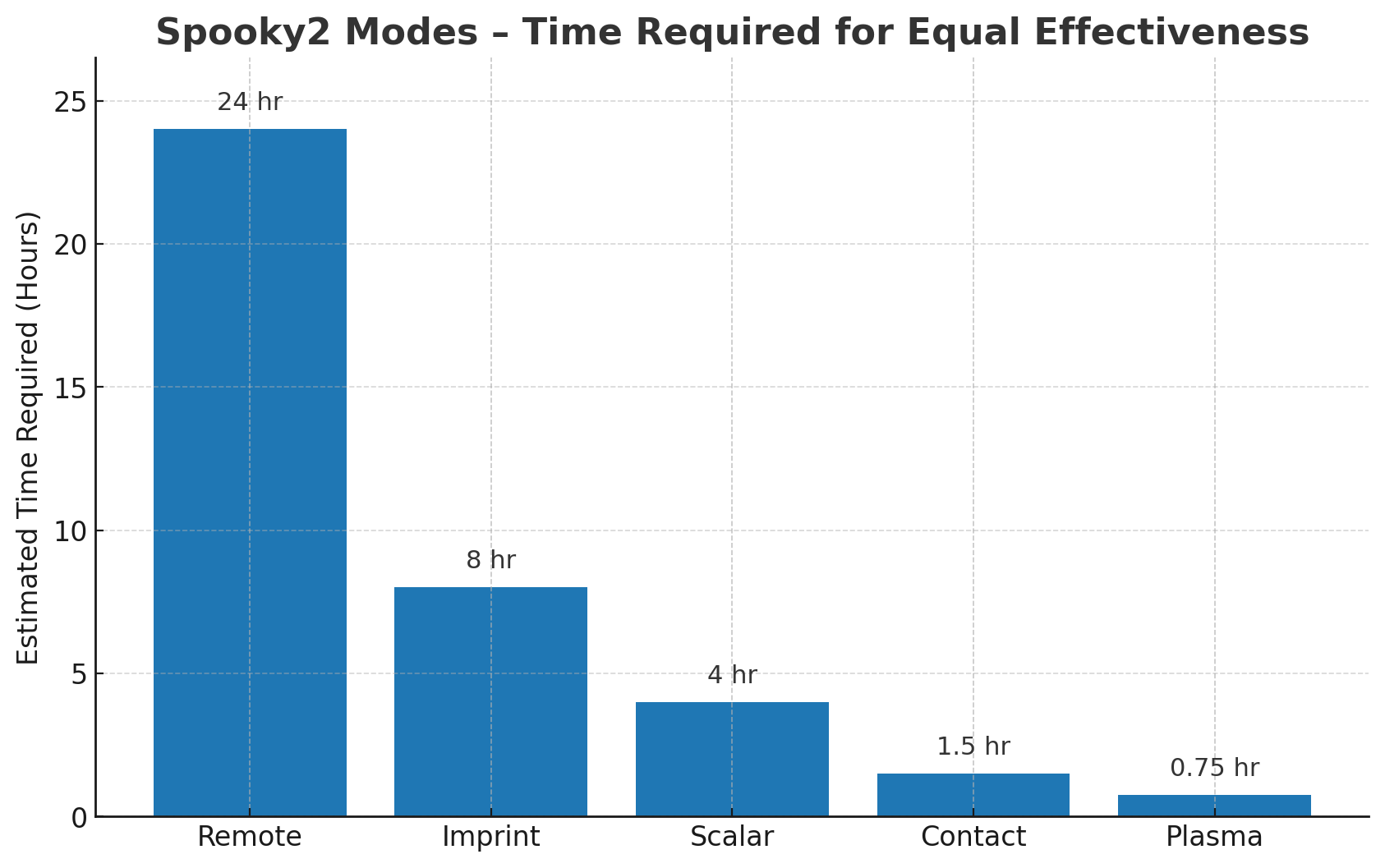
| Power & Speed | Low amplitude, continuous; same effect may take ~24h compared to Plasma | High power, direct to tissue | Very high power, short session; ~45 min ≈ Remote 24h | Moderate power, safe for long exposure |
| Effective Range | Unlimited (DNA link) | Path between electrodes | Near field: 6" strongest, far field: up to 4 ft | Inside scalar field (between units) |
| Best For | Long-term programs, chronic support, overnight running | Acute pain, localized issues, targeted repair | Stubborn conditions, deep penetration | Full-body harmony, nutrient uptake, gentle balancing |
| Key Strengths | 24/7 operation, hands-free, run multiple targets | Fast results, precise targeting | Extremely fast and powerful | Comfortable, can add molecular input |
| Limitations / Cautions | Slower for acute needs | Avoid over metal implants; Avoid use above shoulders | Requires space, more complex setup | Field weakens outside box-to-box line |
 Imprinting stores all selected frequencies into a physical medium such as holographic stickers, crystals, or water for portable, long-lasting use. It’s also a great way to deliver frequencies to your body without a continuous connection to a generator. Learn more in our blog: What Is Frequency Imprinting? Here’s What You Didn’t Know! Effects may fade after 2–4 weeks and can be erased by strong magnets or prolonged sunlight.
2. Advanced Efficiency Hacks
A. Speed Up Delivery
-
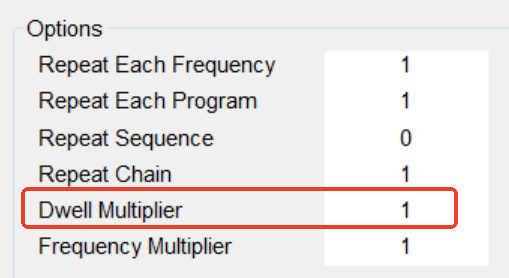
Adjust Dwell Multiplier: Default = 180s per frequency. Programs tab → Reduce Dwell Multiplier to
0.1(18s) So needed frequencies hit the body more often in the same run time. Works for Remote & Contact; Plasma hardware ignores this setting.
-
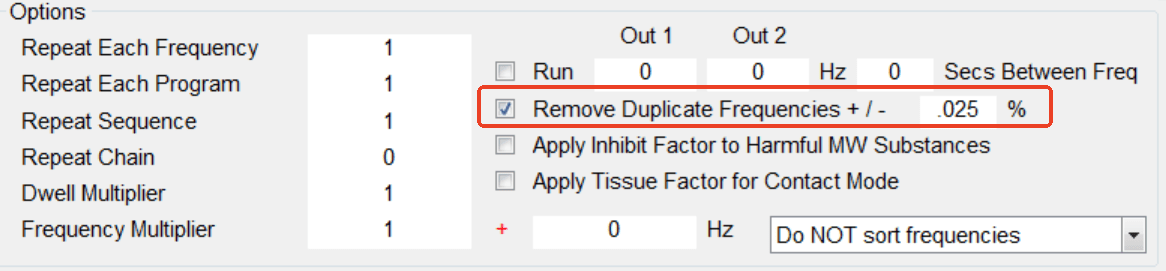
Remove Duplicate Frequencies: Shortens total run time and increases repetition of relevant frequencies. Programs tab → Check “Remove Duplicate Frequencies” (bottom right). This will automatically remove any exact duplicate frequencies from the loaded programs.
B. Reuse Protocols Across Modes
-
Switch Preset mode (Remote → Contact → Scalar → Plasma → Imprint) without clearing Programs to quickly create multi-mode versions of the same protocol.
-
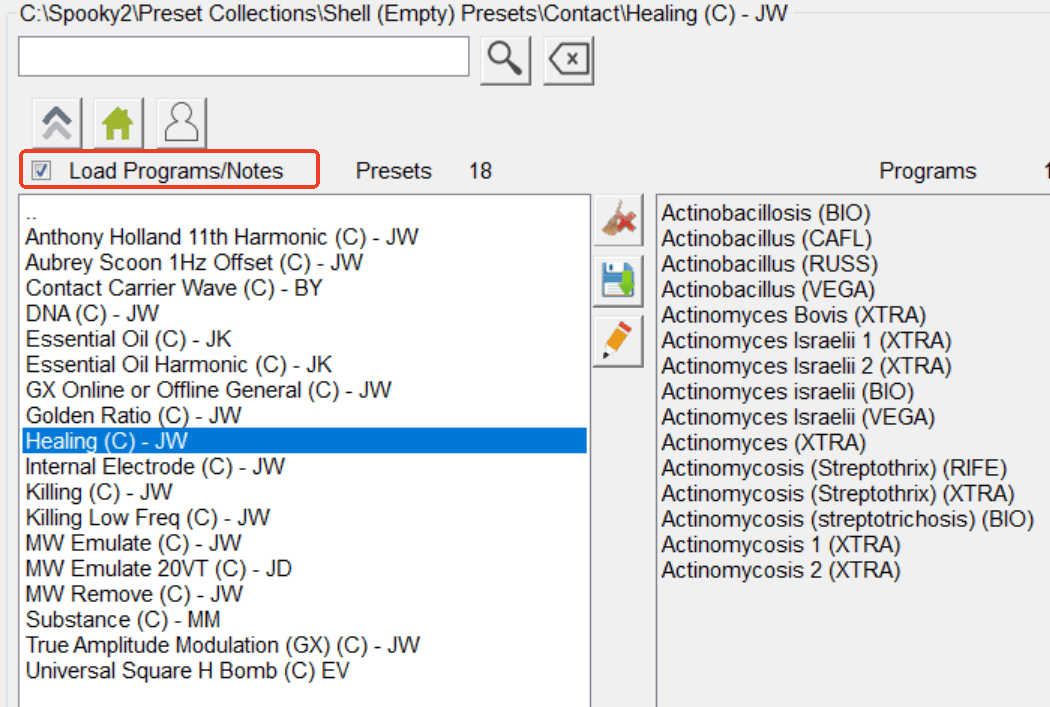
Load Your Protocol – Open Spooky2 and load the Preset/Program you want to reuse.
-
Untick “Load Programs/Notes” – In the Presets tab, uncheck this box to keep your current programs.
-
Select a New Mode – Choose a different mode (Contact, Scalar, Plasma, or Imprint) from Presets; your programs stay loaded.
- Start the New Mode – Go to the Control tab, tick Overwrite Generator, then click Start.
C. Optimize Hardware Setup
-
Startup order: Boot computer first → then power Central/Plasma to avoid software errors.
-
Cable tension: Wrap Plasma cables once and keep slight outward tension for a stable signal.
-
Sample choice: Nails last months and don’t need frequent replacement.
-
Imprint extraction: Remove medium before program ends to avoid Remote magnet erasing it.
3. Combination Strategies That Work
-
Plasma + Remote: Use Plasma for an intense session, then run Remote 24/7 to maintain the effect.
-
Contact + Imprinting: Apply Contact for immediate relief, then carry an imprinted sticker or wearable for ongoing support.
-
Scalar + Molecular Input: Run Scalar with a supplement, vitamin, or herb on the receiver plate to enhance absorption while balancing the body.
-
Mode Rotation: Avoid overstimulation by alternating modes; especially useful for sensitive users.
4. Safety & Reaction Management
Even advanced users need reminders when pushing boundaries.
-
Herx Reaction: If symptoms intensify, stop the program or remove the imprinted medium. Resume when comfortable.
-
Metal Implants: Avoid running Contact across metal implants or pacemaker areas. Scalar, Remote, and Imprinting are generally safe.
-
Drug Frequencies: Be mindful of potential side effects when imprinting molecular weight equivalents of pharmaceuticals.
-
Storage: Keep imprinted materials away from magnets and direct sunlight.
🎥 Watch the Full Tutorial Video
If you want to see more real-world use cases and detailed operating instructions, please watch the video below.
-
Time Efficiency: Plasma delivered the equivalent of a 24-hour Remote run in just 45 minutes.
-
Animal Response: A cat’s behavior shifted overnight after running Schumann Resonance on her nail clipping in Remote mode.
-
Pain Relief on the Go: Users reported a significant reduction in chronic pain by wearing imprinted holographic stickers — sometimes within minutes.
-
AI-Assisted Protocol Design: Using Python to create multi-mode muscle pain protocols revealed unexpected frequency overlaps with inflammation programs, producing better-than-expected results.
The real magic of Spooky2 comes from personalized experimentation. Try different dwell multipliers, mode combinations, and program orders — and keep a record of what works for you. Small tweaks can lead to big breakthroughs.
Your Spooky2 can do more than you think. The next step is yours!
Have questions or want to share your own experiences? Join our community in the Spooky2 Facebook Group to connect with thousands of users, exchange tips, and get support from fellow frequency enthusiasts.

This is an excellent tutorial and reminders of how to optimize this amazing equipment, thank you!
Hi Dany, thank you so much for your kind words! We’re really glad you found the tutorial helpful. Wishing you great success on your Spooky2 journey! 🌟
Now I’m tempted to get the plasma….
Hi Moe! Plasma is definitely a powerful addition to the Spooky2 system. Many users love it for its fast and direct results—if you decide to go for it, I’m sure you’ll find it an exciting upgrade on your journey!
16 remote generators = 1 contact ?
but 16 generators affect the whole body, unlike contact))
Hi Alex, not exactly—16 Remote generators don’t equal 1 Contact generator, but think of it this way: Remote mode delivers low-amplitude signals continuously over a broad area (great for full-body support), while Contact mode delivers those signals more intensely and precisely to a specific area.
In the blog’s comparison chart, Remote is described as “Low amplitude, continuous; same effect may take ~24 h compared to Plasma”, whereas Contact is marked as “High power, direct to tissue”—meaning Contact works faster and more focused, not due to multiplying generators, but due to how & where the energy is delivered.
Spooky2