

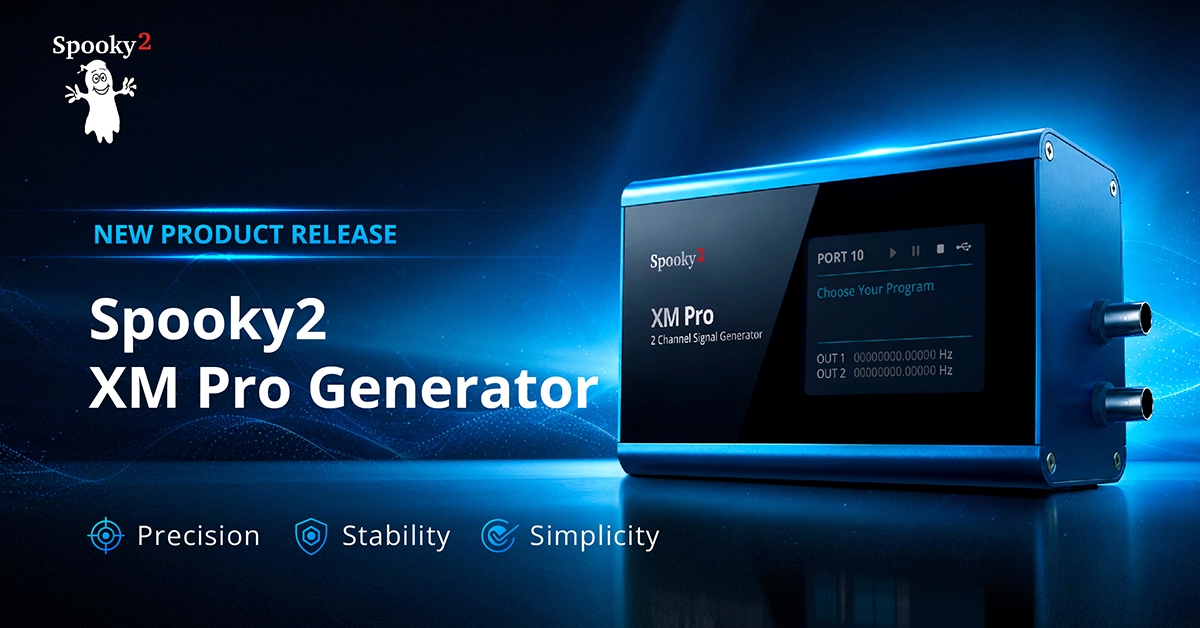
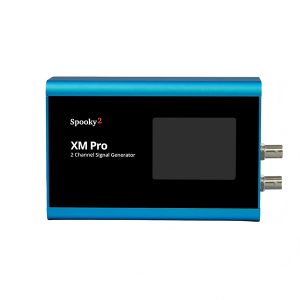
The Spooky2 product family is growing! We are thrilled to welcome a new member today: the Spooky2 XM Pro Generator.
Many of our users began their journey with the classic Spooky2 XM Generator; trusted by thousands with a proven track record of reliability. We strive to make frequency balancing as effortless and effective as possible. This advanced version represents a massive leap forward in precision, reliability and simplicity for your wellness journey.
Key Improvements
Let’s take a look at the key improvements we’ve built into this upgrade:
- Pinpoint Frequency Precision to 0.00001 Hz
Our frequency programs are getting more and more precise. So too is our generator. We’ve made the frequency resolution 1,000 times higher for XM Pro. This unmatched frequency accuracy powers the delivery of your targeted wellness programs. - Doubled Frequency Range
We’ve expanded the maximum frequency limit from 5 MHz to 10 MHz. This upgrade opens up broader compatibility, allowing you to run high-frequency programs seamlessly. - Extended Lifespan for 24/7 Continuous Support
Inheriting the proven reliability and durability of the classic XM Generator, the XM Pro takes this legacy to the next level. Featuring optimized circuitry and industrial-grade solid-state components, the XM Pro Generator provides exceptional stability and peace of mind for your round-the-clock protocols. - Simplified, Intuitive User Interface
XM Pro features a much cleaner layout. Generator status, port number, program names and custom text are displayed directly on your generator screen for streamlined operation. - Smart “Plug-and-Play” Power Protection
With an improved built-in circuitry, XM Pro supports a 4.7 to 14 VDC input range and is fully compatible with both 5V and 12V adapters. - Crisp, Anti-Aliased Display
No more squinting. The upgraded anti-aliased display and optimized UI design help reduce your eye strain with crisper and more intuitive visuals.
Curious about what makes the XM Pro different? Here is a simple breakdown of how the new XM Pro compares to the classic XM Generator you know and trust:
| Spooky2 XM Generator | Spooky2 XM Pro Generator | |
|---|---|---|
| Frequency Range | Up to 5 MHz | Up to 10 MHz |
| Power Input | 5V adaptor only | 4.7V - 14V Fully compatible with 5V and 12V adapters |
| Frequency Resolution | 0.01 Hz | 0.00001 Hz |
| Appearance | Knobs, buttons, and ports | Simplified, intuitive interface |
| Display | Traditional display | Smoother, anti-aliased display |
| UI Information | Mostly technical parameters | Displaying status, port number, program and custom port name for clearer, customer-friendly operation |
| Components | Reliable electrolytic capacitors | Ceramic chip capacitors for extended service life |
Quick Guide
Navigating the new Spooky2 XM Pro Generator is simpler than ever. To help you get started, here is a quick guide.
Note: The Spooky2 XM Pro Generator requires Spooky2 Software version 20260704 or later to be recognized and controlled.
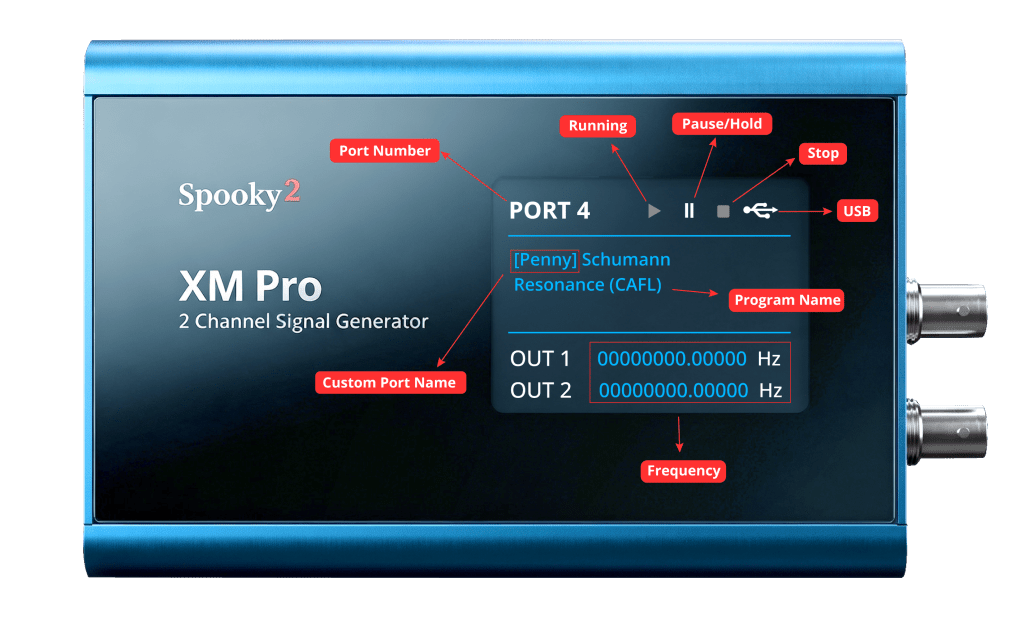
USB Icon
The USB icon in the top-right corner of the screen shows the real-time connection status of your generator.



Grey (Not Connected): Your generator is not connected to the computer.
Red (Not Recognized): Your generator is not recognized by the software. This can be fixed by launching your Spooky2 software or rescanning devices in the software.
White (Connected & Ready): Your generator has been successfully recognized by the software.
Running Status
The three icons next to the USB icon indicate the running status of your programs.

Running

Paused / On Hold

Stopped
Program & Port Display
Once your generator is successfully recognized by the software, your generator screen will display the assigned port number and your custom port name.
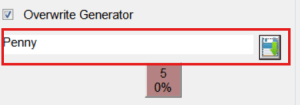
You can set or change the custom port name in the textbox under “Overwrite Generator” in the Control panel. Click the save button, and your custom port name will automatically show up on your generator display.
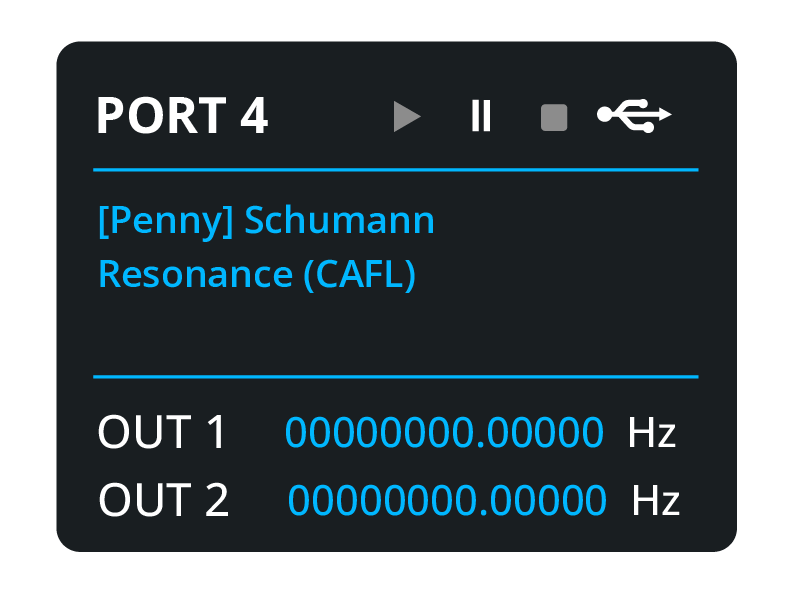
Once you load your preset into the generator, the screen will display the names of the individual programs in your preset instead of the entire preset’s name.
Frequently Asked Questions
Can the XM Pro generator store programs?
No. The XM Pro generator does not support standalone operation.
Can the XM Pro generator do TENS and Sample Digitizer biofeedback scans like the GeneratorX Pro?
No. The XM Pro generator only supports Pulse biofeedback scans via Spooky2 Pulse.
Will the new XM Pro work with all the same equipment and the same software that I use for the standard Spooky2 setups?
Yes. XM Pro works with all Spooky2 modes and the Spooky2 software. Please note that XM Pro requires Spooky2 software version 20260704 or later. The Spooky2 software is compatible with the XM generator, XM Pro, GeneratorX and GeneratorX Pro.
We are incredibly proud to bring the XM Pro Generator into the Spooky2 product family. With optimized UI design and industrial-grade stability built for continuous use 24/7, Spooky2 XM Pro Generator brings you even closer to your wellness goals. Ready to take the next step in your wellness journey? Explore our XM Pro range below:
- Rife Machine Generators, Spooky2 XM Pro Generator
Spooky2 XM Pro Generator
The Spooky2 XM Pro Generator contains two high-precision signal outputs controlled by a “high-speed FPGA ARM microprocessor”. This simple, stable, precise frequency generator allows you to unlock limitless possibilities.
If you are a NEW user, please note that the generator cannot operate on its own and requires additional transmission accessories and the Spooky2 Boost. Our handpicked kits are available for purchase here.
If you want to upgrade your Spooky2 kit, please check this guide.
If you’re not sure which kit to choose, please contact us via online chats or send an email to support@spooky2-mall.com.
Note: The Spooky2 software operates on a Windows PC.
Gentle yet Effective Energy Support
Begin your body energy balancing journey with Spooky2 today. Experience a holistic approach designed to support your body’s natural alignment. With our 30-day satisfaction guarantee, you can get started with total confidence.
Note: The Spooky2 XM Pro Generator requires Spooky2 Software version 20260704 or later to be recognized and controlled. Spooky2 Summer Healing Month Sale!
7% OFF Sitewide – Use Code: Healing2026
SKU: SP-2A30S-05 - All Product, Beginner Frequency Healing Rife Machine Kits, Frequency Healing Rife Machine Kits, Spooky2 New User Kits, Spooky2 Portable Kits, Spooky2 XM Pro Generator Frequency Healing Rife Machine Kits
Spooky2 XM Pro Generator Portable Starter’s Kit
 All Product, Beginner Frequency Healing Rife Machine Kits, Frequency Healing Rife Machine Kits, Spooky2 New User Kits, Spooky2 Portable Kits, Spooky2 XM Pro Generator Frequency Healing Rife Machine Kits
Spooky2 XM Pro Generator Portable Starter’s Kit
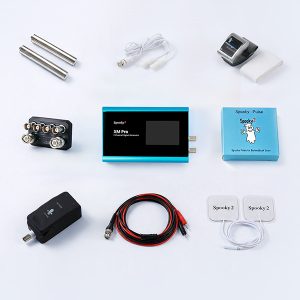
This kit has everything you need to set up your first Spooky2 rig.
The Spooky2 system is powerful, but it can also be confusing, with plenty of options and accessories available. Therefore, we have put everything you need into one convenient package. It is enough for you to start your first Spooky2 energy balancing journey.
If you are a Spooky2 beginner, you can start with this kit. It consists of one Spooky2 XM Pro Generator, Remote mode, Contact mode, Cold Laser, and Pulse Biofeedback.
Note: The Spooky2 software requires Windows.
Access Free Spooky2 Courses and Certified Trainer Services
Gentle yet Effective Energy Support
Begin your body energy balancing journey with Spooky2 today. Experience a holistic approach designed to support your body’s natural alignment. With our 30-day satisfaction guarantee, you can get started with total confidence.Information:
How to Use Spooky2 XM Generator Portable Starter’s Kit
Spooky2 Video Tutorial
Spooky2 Quick Guide
Why do we recommend using multiple generators?SKU: SP-1A30S-30 - All Product, Beginner Frequency Healing Rife Machine Kits, Frequency Healing Rife Machine Kits, Spooky2 New User Kits, Spooky2 Portable Kits, Spooky2 XM Pro Generator Frequency Healing Rife Machine Kits
Spooky2 XM Pro Generator Portable Essential Kit
 All Product, Beginner Frequency Healing Rife Machine Kits, Frequency Healing Rife Machine Kits, Spooky2 New User Kits, Spooky2 Portable Kits, Spooky2 XM Pro Generator Frequency Healing Rife Machine Kits
Spooky2 XM Pro Generator Portable Essential Kit
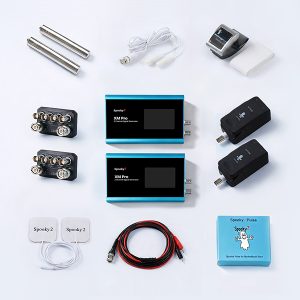
Spooky2 XM Pro Generator Portable Essential Kit contains all the fundamental components to support your wellness needs.
The Spooky2 ecosystem offers a vast array of options. We’ve made things easier for you by putting the must-have essentials into one single package. This kit provides everything you need to begin your personal energy balancing journey.
This kit includes two Spooky2 XM Pro Generators, Remote mode, Contact mode, Cold Laser, and Pulse Biofeedback accessories. The two generators can operate simultaneously for different purposes.
For multiple Spooky2 XM Pro Generator connections, you can order a Spooky2 10 Port USB 3.0 Hub or a Spooky2 Quad 5V Power Supply.
Note:
- At Spooky2, we are always trying our best to protect our environment. We have updated our kit packaging to a more sustainable portable case. You will receive an $18 USD discount when purchasing this portable kit.
- The Spooky2 software requires Windows.
Access Free Spooky2 Courses and Certified Trainer Services
Gentle yet Effective Energy Support
Begin your body energy balancing journey with Spooky2 today. Experience a holistic approach designed to support your body’s natural alignment. With our 30-day satisfaction guarantee, you can get started with total confidence.Information:
How to Use Spooky2 XM Generator Portable Essential Kit
Spooky2 Video Tutorial
Spooky2 Quick Guide
Why do we recommend using multiple generators?SKU: SP-1A30S-31 - All Product, Frequency Healing Rife Machine Upgrade Kits, Spooky2 Portable Kits, Spooky2 XM Pro Generator Frequency Healing Rife Machine Kits
Spooky2 XM Pro Generator Remote Kit
 All Product, Frequency Healing Rife Machine Upgrade Kits, Spooky2 Portable Kits, Spooky2 XM Pro Generator Frequency Healing Rife Machine Kits
Spooky2 XM Pro Generator Remote Kit
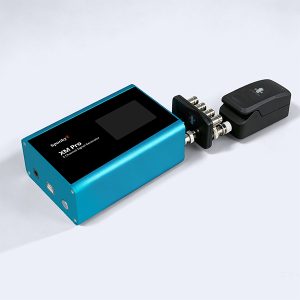
This kit contains everything you need to set up and run Spooky2 Remote mode. Spooky2 Remote mode can deliver frequencies to you at any distance. This was referred to as the “spooky action at a distance” by Albert Einstein. This budget-friendly Spooky2 XM Pro Generator Remote Kit is ideal for new users.
Note: The Spooky2 software requires Windows.
Access Free Spooky2 Courses and Certified Trainer Services
Gentle yet Effective Energy Support
Begin your body energy balancing journey with Spooky2 today. Experience a holistic approach designed to support your body’s natural alignment. With our 30-day satisfaction guarantee, you can get started with total confidence.Information:
How to Use Spooky2 XM Generator Remote Kit
Spooky2 Video Tutorial
Spooky2 Quick Guide
Why Are Multiple Generators Suggested for Certain Conditions?Note: The Spooky2 XM Pro Generator requires Spooky2 Software version 20260704 or later to be recognized and controlled.
SKU: SP-1A21S-17 - Colloidal Silver Rife Machine Kits, Frequency Healing Rife Machine Kits, Frequency Healing Rife Machine Upgrade Kits, Spooky2 Portable Kits, Spooky2 XM Pro Generator Frequency Healing Rife Machine Kits
Spooky2 Portable Colloidal Silver XM Pro Generator Kit
 Colloidal Silver Rife Machine Kits, Frequency Healing Rife Machine Kits, Frequency Healing Rife Machine Upgrade Kits, Spooky2 Portable Kits, Spooky2 XM Pro Generator Frequency Healing Rife Machine Kits
Spooky2 Portable Colloidal Silver XM Pro Generator Kit
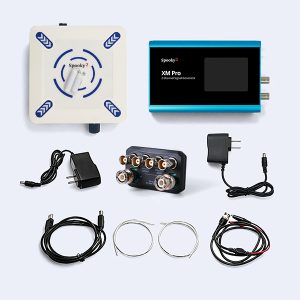
This kit has everything you need to make high-quality colloidal silver.
Colloidal silver is a suspension of tiny silver particles in liquid. Spooky2 Portable Colloidal Silver XM Pro Generator Kit allows you to make your own fresh high-quality colloidal silver, easily and affordably.
Note: The Spooky2 software requires Windows.
Access Free Spooky2 Courses and Certified Trainer Services
Gentle yet Effective Energy Support
Begin your body energy balancing journey with Spooky2 today. Experience a holistic approach designed to support your body’s natural alignment. With our 30-day satisfaction guarantee, you can get started with total confidence.Note:
Dear Spooky2 friends,
The product prices may vary slightly due to fluctuations in raw material costs. We truly appreciate your understanding and support.Information:
How to Use Spooky2 Portable Colloidal Silver Generator KitSKU: SP-1A40S-04

This is a great news. Despite having Spooky2 GeneratorX Pro I’m a regular user of 3 Spooky2 XM Generators for over 3 years (for personal use). Increasing the frequency range is what I missed the most. Good work and thank you for everything.
Hi Jacek! Thank you so much for your support. We always strive to improve our user experience and help you unlock more possibilities 🙂
What does that mean exactly? increased frequency range = programs & peptides work better?
Hi Hirad. Spooky2 uses harmonics to adapt frequencies that exceed a generator’s range by converting them into workable harmonic equivalents. A higher frequency limit allows the generator to produce outputs closer to the original frequency values, which may provide a more accurate frequency representation and potentially enhance the overall experience.
What is the simplified version that works like Royal Rife’s original with the plasma bulb? He had 1 machine that worked. Your company has too many product and it’s overwhelming and confusing. Are most of your units adjustable TENS units? What machine cures cancer like Rife’s? What about swollen lymph nodes? He had people sit y his Plasma unit for 3 minutes week and cured cancer. I am not trying to be difficult but like I said, it’s overwhelming and confusing. Also, I live near Los Angeles, California. Where can I go buy one. Thank you.
Hi Robert. Spooky2 Central includes the Plasma unit alongside three other built-in modes: PEMF, Contact, and Ultrasonic. Please note that the Plasma mode requires a generator to operate. You can check out our updated Spooky2 Central kits here: https://www.spooky2-mall.com/product-category/kits/spooky2-central-plasma-kits/
For purchasing advice, feel free to connect with our support team via online chat or email us directly at support@spooky2-mall.com
Is it still a 10-BITS generator?
Hi. The amplitude resolution is 8 bit.
Hi,
I would like to know what this mean comparing to the old generatos, “Precision down to 0.00001 Hz”?
Better to cure illnesses?
Rgds,
Roger
Hi Roger. A higher frequency precision helps improve effectiveness, especially with precisely calculated programs. It’s like tuning to a radio station at 100.1 FM—you might still receive the signal when you’re slightly out of tune, but with more static noise. Higher precision locks you onto the exact 100.1 FM frequency for a clear reception.
Thank you for your answer.
I’m interested in biofeedback scanning since it would take the guess work out of what would be the best unique frequency needs for an individual. Will this new generator make scans quicker/easier than the older XM model?
Hi Sabrina. The BFB scan function with the XM Pro remains the same as with the XM generator (Pulse scan). If a full Pulse scan takes too long, you can run half or quarter scans instead. Alternatively, you can use the TENS scan or Sample Digitizer scan functions with the GX Pro.
Is this working with Spooky2 Skalar?
Yes. XM Pro generator works with Spooky2 Scalar. Please note that Scalar Digitizer BFB scans can only be performed via GeneratorX Pro.
hi, Is it possible to perform a bioscan with it?
Hi Gabriel. The XM Pro generator supports Pulse biofeedback scan.
will there also a new version of Gen X PRO that can run peptides standalone (without computer) ?
Hi Johan! We really appreciate your feedback. We’ve logged your suggestion for our development team to review and consider for future improvements.
Hi
Does the new Spooky2 XM Pro Generator need a computor to run?
Carl
Hi Carl. Yes, the XM Pro Generator does not support standalone operation and must be controlled through the Spooky2 software.
Is it possible to monitor a remote scan that’s loaded and running the Spooky2 software on your home computer using your smartphone when you’re away from your computer?
Hi! Our software requires a Windows desktop to run properly, so mobile app monitoring isn’t currently supported, and smooth performance on non-Windows systems can’t be guaranteed.
Also, please note that we don’t offer a “Remote scan” biofeedback mode. The only wireless biofeedback mode available is the Sample Digitizer scan, which runs using biological samples.