

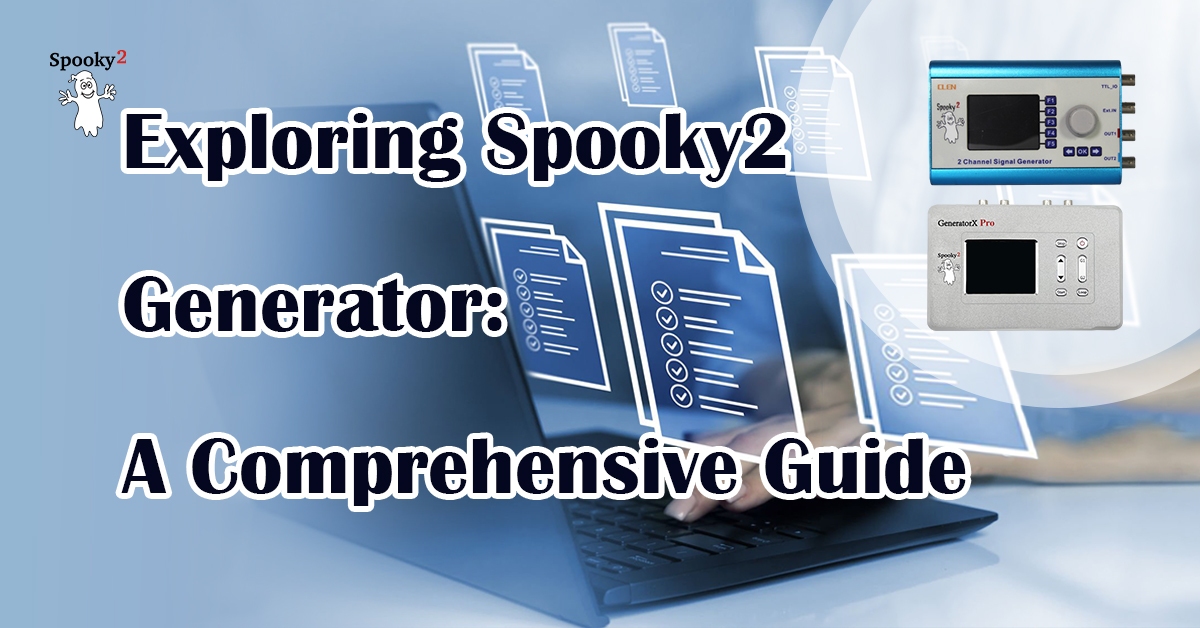
The Spooky2 Generator is a precision frequency device within the Spooky2 Rife System, available in two models: the Spooky2-XM, which requires external power, and the GeneratorX Pro, which supports standalone operation and high-frequency output. Each model offers unique features for effective and versatile frequency therapy.
Overview of Spooky2 XM and GeneratorX Pro
Spooky2-XM Generator: Known for its ultra-low power consumption and stable waveform generation, the XM model uses direct digital synthesis and FPGA/ARM technology, making it one of the most affordable Rife treatment devices with free software updates and an extensive frequency database.
GeneratorX Pro: With dual DDS generators, offline storage for 30 programs, and a frequency range up to 40 MHz, GeneratorX Pro provides greater accuracy and flexibility.

- All Product, Beginner Frequency Healing Rife Machine Kits, Frequency Healing Rife Machine Kits, Spooky2 New User Kits, Spooky2 Portable Kits, Spooky2 XM Pro Generator Frequency Healing Rife Machine Kits
Spooky2 XM Pro Generator Portable Starter’s Kit
 All Product, Beginner Frequency Healing Rife Machine Kits, Frequency Healing Rife Machine Kits, Spooky2 New User Kits, Spooky2 Portable Kits, Spooky2 XM Pro Generator Frequency Healing Rife Machine Kits
Spooky2 XM Pro Generator Portable Starter’s Kit
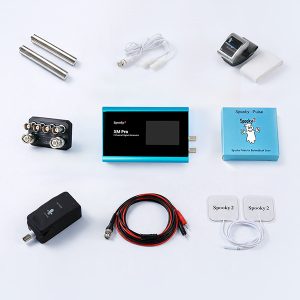
This kit has everything you need to set up your first Spooky2 rig.
The Spooky2 system is powerful, but it can also be confusing, with plenty of options and accessories available. Therefore, we have put everything you need into one convenient package. It is enough for you to start your first Spooky2 energy balancing journey.
If you are a Spooky2 beginner, you can start with this kit. It consists of one Spooky2 XM Pro Generator, Remote mode, Contact mode, Cold Laser, and Pulse Biofeedback.
Note: The Spooky2 software requires Windows.
Access Free Spooky2 Courses and Certified Trainer Services
Gentle yet Effective Energy Support
Begin your body energy balancing journey with Spooky2 today. Experience a holistic approach designed to support your body’s natural alignment. With our 30-day satisfaction guarantee, you can get started with total confidence.Information:
How to Use Spooky2 XM Generator Portable Starter’s Kit
Spooky2 Video Tutorial
Spooky2 Quick Guide
Why do we recommend using multiple generators?SKU: SP-1A30S-30 - All Product, Beginner Frequency Healing Rife Machine Kits, Frequency Healing Rife Machine Kits, Spooky2 New User Kits, Spooky2 Portable Kits, Spooky2 XM Pro Generator Frequency Healing Rife Machine Kits
Spooky2 XM Pro Generator Portable Essential Kit
 All Product, Beginner Frequency Healing Rife Machine Kits, Frequency Healing Rife Machine Kits, Spooky2 New User Kits, Spooky2 Portable Kits, Spooky2 XM Pro Generator Frequency Healing Rife Machine Kits
Spooky2 XM Pro Generator Portable Essential Kit
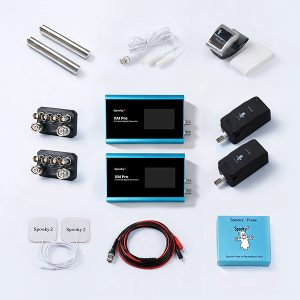
Spooky2 XM Pro Generator Portable Essential Kit contains all the fundamental components to support your wellness needs.
The Spooky2 ecosystem offers a vast array of options. We’ve made things easier for you by putting the must-have essentials into one single package. This kit provides everything you need to begin your personal energy balancing journey.
This kit includes two Spooky2 XM Pro Generators, Remote mode, Contact mode, Cold Laser, and Pulse Biofeedback accessories. The two generators can operate simultaneously for different purposes.
For multiple Spooky2 XM Pro Generator connections, you can order a Spooky2 10 Port USB 3.0 Hub or a Spooky2 Quad 5V Power Supply.
Note:
- At Spooky2, we are always trying our best to protect our environment. We have updated our kit packaging to a more sustainable portable case. You will receive an $18 USD discount when purchasing this portable kit.
- The Spooky2 software requires Windows.
Access Free Spooky2 Courses and Certified Trainer Services
Gentle yet Effective Energy Support
Begin your body energy balancing journey with Spooky2 today. Experience a holistic approach designed to support your body’s natural alignment. With our 30-day satisfaction guarantee, you can get started with total confidence.Information:
How to Use Spooky2 XM Generator Portable Essential Kit
Spooky2 Video Tutorial
Spooky2 Quick Guide
Why do we recommend using multiple generators?SKU: SP-1A30S-31 - All Product, Beginner Frequency Healing Rife Machine Kits, Frequency Healing Rife Machine Kits, Spooky2 GeneratorX Pro Frequency Healing Rife Machine Kits, Spooky2 New User Kits, Spooky2 Portable Kits
Spooky2 Portable GeneratorX Pro Essential Kit
 All Product, Beginner Frequency Healing Rife Machine Kits, Frequency Healing Rife Machine Kits, Spooky2 GeneratorX Pro Frequency Healing Rife Machine Kits, Spooky2 New User Kits, Spooky2 Portable Kits
Spooky2 Portable GeneratorX Pro Essential Kit
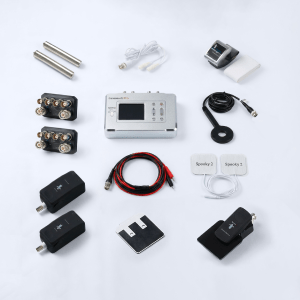
GeneratorX Pro (GX Pro) is the world’s most powerful Rife generator, brimming with advanced features.
Each GX Pro contains 2 function generators, which is a total of 4 frequency outputs plus a full Biofeedback system.
GX Pro can run at 40 MHz with any waveform, and can also load up to 30 programs from Spooky2 software. The most important feature of the GX Pro is its ability to run standalone without needing to stay connected to a computer. Simply load the programs onto the device using a computer, and it will continue to operate independently.
If you need help with acute problems, chronic problems, or serious problems, the Spooky2 Portable GeneratorX Pro Essential Kit will be the best way to start.
Note:
- At Spooky2, we are always trying our best to protect our environment. We have updated our kit packaging to a more sustainable portable case.
- The Spooky2 software requires Windows.
Access Free Spooky2 Courses and Certified Trainer Services
Gentle yet Effective Energy Support
Begin your body energy balancing journey with Spooky2 today. Experience a holistic approach designed to support your body’s natural alignment. With our 30-day satisfaction guarantee, you can get started with total confidence.Information:
How to Use Spooky2 Portable GeneratorX Pro Essential Kit
Spooky2 Video Tutorial
Spooky2 GeneratorX Pro User’s Guide
How to Do GX Pro TENS Scan
The Differences Between GX Pro and the XM GeneratorSKU: SP-1B30S-15
First-Time Setup and Connection for XM Generator
To set up your Spooky2 Generator, we’ll use the Spooky2 XM Generator as an example. Please start by powering on the generator and connecting it to your PC via USB. Then, open the Spooky2 software to ensure smooth communication with your device. For a step-by-step guide, watch this setup video.
Loading Programs into GeneratorX Pro
After connecting your GeneratorX Pro,you can load therapy programs. Begin by selecting a preset, like the Terrain Protocol, to maximize effectiveness. To lear how to do this, watch this program loading video.
Operating Spooky2 Software in 5 Simple Steps
You can operate the Spooky2 software in five simple steps. This guide will be presented as a mind map for easy understanding.

Real-Life Experiences with Spooky2
For more information, please watch the Spooky2 Generator training course held by Bradley Johnson.
Q&A about Spooky2 Generator
Q: Is it better to buy GeneratorX or multiple XM generators?
Answer: You’d better have at least one GenX if you can afford it and then buy additional XM generators as you need them.
GeneratorX and XM generators can be run all at the same time.
For more details, please check the link: https://www.spooky2.com/forums/viewtopic.php?f=65&t=10686
Q: How do I troubleshoot if the Channel lights don’t go from red to blue when the XM generator is running?
Answer: This can happen when communication gets lost between the computer and the generator. When communication stops between these 2 pieces of equipment It can also do the opposite where the generator just runs the last frequency over and over until manually stopped, which can cause frequency fatigue. So the equipment should always be checked regularly to make sure this isn’t happening.
For more details, please check the link: https://www.facebook.com/groups/spooky2/posts/2011767578985135/
Q: What is the difference between GX Pro and XM Generator?
Answer: 1. GeneratorX Pro Scans are the primary benefit and convenience since you are basically powering two Generators with one USB and power plug. Plus, if you need to, you can run it standalone without a computer. You can run the XM without a computer but it’s definitely not easy or recommended. Remote, Contact and other accessories function the same. No real benefit for the GeneratorX Pro over XM there.
- For Generator Pro, the scan is shorter and more precise and can load 30 programs to later use without a computer. It also scans body fluids with Sample Digitizer which has been amazing!
- Please check this blog for details:
https://www.spooky2-mall.com/blog/what-is-the-difference-between-generatorx-gx-and-the-xm-generator/
Q: Why did Spooky2 recognize only one generator when I restarted two generators? All Spooky2 Remotes have indicator lights on for both generators.
A: Exit Spooky program, switch off both generators and disconnect USB cables.
Open Device Manager and keep on screen. Connect one USB and switch on the XM, wait for device manager to confirm the Port, then connect and switch on the other.
You should now have both working, you might have different channel numbers/Com port numbers if the ports were not closed due to an unregulated close down.
For more details, please check the link:
http://www.spooky2.com/forums/viewtopic.php?f=74&t=5407
Q: How to set up GenX programs to run stand-alone?
A: GeneratorX can be run in standalone mode, which means you can run desired programs without connecting to a computer. Follow the link below to load programs into GeneratorX:
How to Load Programs into GeneratorX?
https://www.spooky2-mall.com/blog/how-to-load-programs-into-generatorx/
Note: here are some restrictions or limitations of running GeneratorX stand-alone.
Each program is limited to 200 frequencies, each using the same waveform, amplitude, offset and duration (dwell).
The Out 2 signal will be the inverse of Out 1. You cannot use Out 2 for modulation for Spooky Central or Spooky Plasma. However, special presets are available which allow these machines to run connecting only Out 1 at the Input.
Frequencies are fixed, with no sweeps. If a program containing a sweep is loaded, only the start frequency is used.
Q: How can programs be run continuously with Generator X pro?
A: In the Programs tab, at the bottom of the screen are options for Repeat XXX. If you set any one of those to “0”, it will repeat that until stopped. Most of us use “Repeat Sequence” to run programs via remote.
You may need to be careful, however, in running only one Frequency for many repeats. Some people are rather sensitive to one frequency running a long time without changing to something else. I need to have 3 or 4 frequencies in the rotation to allow it to run for a number of hours.
For more details, please check this link:
https://www.facebook.com/groups/spooky2/permalink/1099944576834111/
