


Detoxification is essential for maintaining optimal health and well-being. Many people are increasingly turning to frequency healing as a natural way to support their detox efforts. In this blog, we will explore the concept of Terrain, the Herxheimer reaction, and provide a live demonstration of how to use Spooky2 Terrain effectively. We’ll also guide you through loading the program on the GeneratorX Pro in standalone mode and end with a Q&A session to address any lingering questions.
1. Understanding Terrain: What Is It and When Should I Detox?
Detoxification (detox for short) means the elimination or removal of toxic substances from the human body. We live in an increasingly toxic environment. While we may not find ourselves at the scene of an accidental chemical leak, all of us are chronically exposed to toxins daily. The toxins accumulate in our body over time and have been shown to hurt health.
When you’re dealing with a serious condition, it’s a very good idea to start by preparing your body for the war you’re about to wage. At Spooky2, we recommend users run the Terrain Protocol Preset for detoxification before starting their Rife frequency treatment. Because Terrain Protocol was designed for full body detox, it will help your body prepare for Rife frequency treatment.
The Spooky2 Terrain program includes various presets that help optimize your body’s energy for detoxification. These presets target different aspects of your health, such as boosting your immune system, improving circulation, and facilitating the elimination of toxins. It’s crucial to listen to your body and adjust your selections as necessary.
2. The Herxheimer Reaction: What You Need to Know
As you begin your detox journey, it’s essential to be aware of the Herxheimer reaction, commonly known as a “Herx.” This reaction can occur when your body starts to detoxify rapidly, often leading to temporary symptoms such as fatigue, headache, or flu-like symptoms. While these reactions can be uncomfortable, they typically indicate that the detoxification process is working.
To minimize the severity of Herxheimer reactions, start with lower frequencies and gradually increase them as your body adapts. Staying hydrated and incorporating supportive practices, like gentle exercise and restful sleep, can also help ease any discomfort.
3. Which Detox Preset to Choose?
The Terrain Protocol is a carefully stepped detoxification process. It prepares the terrain in your body to be more available or receptive to further Rife treatments. Start by selecting the Detox option from the Presets tab.
| Preset | Terrain – Full Body | Terrain – Mercury | Terrain – Nonviolent | Terrain – Low Power | Detox Maintenance |
|---|---|---|---|---|---|
| Target | Comprehensive full-body detox (parasites, toxins, etc.) | Mercury and heavy metals removal | Gentler detox, for sensitive users | Gradual detox for highly sensitive users | Regular detox maintenance after initial detox |
| Intensity | High intensity | High intensity | Low intensity, slower process | Low intensity | Moderate, designed for ongoing detox support |
| Power | Standard power | Standard power | Standard power | Lower power | Standard power |
| Programs | 11 Days Day 1: Remove Metals Day 2: Remove Metals Day 3: Remove Chemical Materials Day 4: Remove Systemic Toxins 1 Day 5: Remove Systemic Toxins 2 Day 6: Remove Intestinal Toxins, Remove Systemic Toxins 3 Day 7: Parasites and Liver Function Day 8: Kidney Function 1 Day 9: Kidney Function 2, Cleanse Blood Day 10: Kidney and Liver Toxins, Intestinal Parasites Day 11: Lymphatic System 1, Lymphatic System 2 | 11 Days Day 1: Remove Metals Minus Mercury Day 2: Remove Metals Minus Mercury Day 3: Remove Chemical Materials Day 4: Remove Systemic Toxins 1 Day 5: Remove Systemic Toxins 2 Day 6: Remove Intestinal Toxins, Remove Systemic Toxins 3 Day 7: Parasites and Liver Function Day 8: Kidney Function 1 Day 9: Kidney Function 2, Cleanse Blood Day 10: Kidney and Liver Toxins, Intestinal Parasites Day 11: Lymphatic System 1, Lymphatic System 2 | 10 Days Day 1: Remove Metals Day 2: Remove Metals Day 3: Remove Chemical Materials Day 4: Remove Systemic Toxins 1 Day 5: Remove Systemic Toxins 2 Day 6: Remove Intestinal Toxins, Remove Systemic Toxins 3 Day 7: Liver Function Day 8: Kidney Function 1 Day 9: Kidney Function 2, Kidney and Liver Toxins Day 10: Lymphatic System 1, Lymphatic System 2 | The Same as Terrain – Full Body | Detox 4 Toxins Throughout the Body (CAFL) Detox 3 Toxins in the Kidneys and Liver (PROV) Detox 2 Parasites in the Intestines (CAFL) Detox 1 Toxins in the Intestines (CAFL) Lymphangitis (CAFL) Streptococcus Pyogenes (CAFL) Lymphs and Detox (PROV) |
4. Live Demonstration: How to Effectively Use Spooky2 Terrain
During the demo, you will learn how to navigate the Spooky2 interface, select appropriate presets, and adjust settings based on your unique needs.
5. Step-by-Step Guide: Loading the Program and Running GeneratorX Pro in Standalone Mode
Using the GeneratorX Pro to run the Spooky2 Terrain program in standalone mode is straightforward. Follow these simple steps:
-
All Product, Beginner Frequency Healing Rife Machine Kits, Frequency Healing Rife Machine Kits, Spooky2 GeneratorX Pro Frequency Healing Rife Machine Kits, Spooky2 New User Kits, Spooky2 Portable Kits
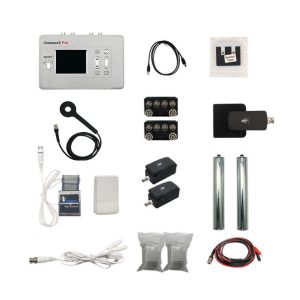
Spooky2 Portable GeneratorX Pro Essential Kit
 All Product, Beginner Frequency Healing Rife Machine Kits, Frequency Healing Rife Machine Kits, Spooky2 GeneratorX Pro Frequency Healing Rife Machine Kits, Spooky2 New User Kits, Spooky2 Portable Kits
Spooky2 Portable GeneratorX Pro Essential Kit
GeneratorX Pro(GX Pro) is the world’s most powerful Rife generator, brimming with the most advanced features.
Each GX Pro contains 2 function generators, which is a total of 4 frequency outputs plus a full Biofeedback system.
GX Pro can run at 40 MHz with any waveform, and can also load up to 30 programs from Spooky2 software. The most important feature of the GX Pro is its ability to run standalone without needing to stay connected to a computer. Simply load the programs onto the device using a computer, and it will continue to operate independently.
If you need to help with acute problems, chronic problems or serious problems, Spooky2 Portable GeneratorX Pro Essential Kit will be the best way to start.
Note:
- At Spooky2, we are always trying our best to protect our environment. We have updated our kit packaging to a more sustainable portable case.
- The Spooky2 software requires Windows.
Access Free Spooky2 Courses and Certified Trainer Services
Safe and Effective Energy Balancer
Start your body energy-balancing journey with Spooky2 now! This is the best non-drug solution for your body’s energy balance. We offer you a 30-day satisfaction guarantee, so you have nothing to lose but your conditions.Information:
How to Use Spooky2 Portable GeneratorX Pro Essential Kit
Spooky2 Video Tutorial
Spooky2 GeneratorX Pro Users Guide
How to Do GX Pro TENS Scan
The Differences Between GX Pro and the XM GeneratorSKU: SP-1B30S-15 -
All Product, Frequency Healing Rife Machine Kits, Frequency Healing Rife Machine Upgrade Kits, Spooky2 GeneratorX Pro Frequency Healing Rife Machine Kits, Spooky2 Portable Kits
Spooky2 Portable GeneratorX Pro Remote Kit
 All Product, Frequency Healing Rife Machine Kits, Frequency Healing Rife Machine Upgrade Kits, Spooky2 GeneratorX Pro Frequency Healing Rife Machine Kits, Spooky2 Portable Kits
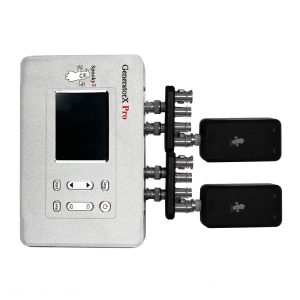
Spooky2 Portable GeneratorX Pro Remote Kit
GeneratorX Pro(GX Pro) is the world’s most powerful Rife generator, brimming with the most advanced features. It is more advanced than our original Spooky2-XM Generator.
Each GX Pro contains 2 function generators, which is a total of 4 frequency outputs plus a full Biofeedback system.
GX Pro can run at 40 MHz with any waveform, and can also load up to 30 programs from Spooky2 software. The most important feature of the GX Pro is its ability to run standalone without needing to stay connected to a computer. Simply load the programs onto the device using a computer, and it will continue to operate independently.
Note:
- At Spooky2, we are always trying our best to protect our environment. We have updated our kit packaging to a more sustainable portable case.
- The Spooky2 software requires Windows.
Access Free Spooky2 Courses and Certified Trainer Services
Safe and Effective Energy Balancer
Start your body energy-balancing journey with Spooky2 now! This is the best non-drug solution for your body’s energy balance. We offer you a 30-day satisfaction guarantee, so you have nothing to lose but your conditions.Information:
How to Use Spooky2 Portable GeneratorX Pro Remote Kit
Spooky2 GeneratorX Pro Users Guide
Spooky2 GeneratorX Pro Q&A
How to Do GX Pro TENS Scan
The Differences Between GX Pro and the XM GeneratorSKU: SP-1B21S-11
6. Interactive Q&A Session: Your Questions Answered
Q1: How often should the terrain protocol be run?
A: Some people run the protocol 2 to 3 times per year. It would depend on each person’s health condition.
And there is a suggestion that running Terrain for people with serious health conditions is not always a great idea. If it were me, I’d be running Detox Maintenance 24/7 (long term) on remote, along with plenty of support presets.
For more details, you can check the link:https://www.spooky2support.com/hc/en-us/articles/360022666173-Is-it-okay-to-run-the-Terrain-protocol-back-to-back-
Q2: Can I run terrain protocol in contact mode with standalone?
A: Yes, you can run these programs in contact mode standalone. Once you have loaded the programs onto your GX/GX Pro, you can run them in any mode, contact, remote, pemf, etc. Connect the relevant accessories that you want to your GX/GX Pro.
Q3: Can you run terrain protocol with scalar overnight?
A: If you use our product the first time, we suggest you better not do that because running terrain protocol may make you feel tired and dizziness, if that happens, you need to quit immediately. But if you feel OK, the treatment duration depends on your body condition.
For more information, you can check he link:https://www.spooky2support.com/hc/en-us/articles/1500000300882-Do-you-recommend-running-the-Terrain-protocol-using-Scalar-or-Contact-mode-in-addition-to-Remote-
Q4: How long each day does Terrain protocol run for?
A: Terrain protocol detox is 11 days 24/7 on Remote. Via Contact, it is a few hours per day but you are hooked up to TENS pads. It is suggested to do Terrain first then you can go to your biofeedback to see what your body needs.
For more details, please check the link:https://www.facebook.com/groups/spooky2/permalink/1677534825741747/
Q5: Is it safe to put multiple DNA together for Detox Terrain program?
A: Totally OK. You can put as many as can fit with the remote closed. Make sure the DNA samples are separated with paper labels. Paper labels for a printer are fine. many get good results with masking tape.
For more details, please click this link:https://www.facebook.com/groups/spooky2/permalink/1769538259874736/
Q6: How can I resume my Terrain Protocol if my laptop accidentally shuts down?
A: It is always important to note which day you are on when running the Terrain Protocol so that you can start from the step you were at before. Here is a blog that demonstrates how you can resume your Terrain Protocol:https://www.spooky2-mall.com/blog/how-to-resume-terrain-protocol/
Q7: Does the DNA Samples need to be a certain size?
A: No, you just put the DNA samples on the stickers. The size has no impact on the treatment effect.
Q8: Does nail polish effect with nails as DNA?
A: Nail polish doesn’t effect because there is no DNA in the polish, and it doesn’t affect energy transfer.
For more details, please check the link:https://www.facebook.com/groups/spooky2/permalink/1693632170798679/
Q9: Can you run programs on kids? What age?
A: We suggest run programs on kids no more than 7years old, but if you do need to do that, you better run some gentle frequencies or programs. During treatment, pay attention to your kids and quit it if he/she feel unwell.
For more information, you can check the link:https://www.spooky2support.com/hc/en-us/articles/224024908-What-s-the-youngest-age-of-children-you-could-use-the-remote-setting-on-
Q10: Can I run a generator with remote programs and a biofeedback scan on another generator at the same time?
A: No. You need to pause any programs being run on you while you do a biofeedback scan otherwise it will affect the results.
For more details, please check:https://www.facebook.com/groups/spooky2/permalink/968439093317994/
Q11: Do you need to switch out your DNA after so many days?
A: It depends on what DNA sample you choose. If you choose fingernails, they can be preserved for several years without needing to be switched out, but if you choose saliva, it should be renewed every three days.
For more details, you can check the link:https://www.spooky2-mall.com/blog/what-source-of-dna-for-remote-rife-and-how-long-it-lasts/
Q12: How can you place DNA for more than one person in the holder?
A: You can put the DNA from different people on the stickers separately, write their names on each, then put the stickers on the holders. But remember to do that on the condition that you run the same program.
For more instructions, you can check the link:https://www.spooky2-mall.com/blog/spooky-remote-v-2-0-instruction/
Q13: I have a total hip replacement, will that cause any problems?
A:It depends on which modes you use, if you use remote mode, no issues, but if you use contact mode, you may feel something unpleasant.
For more details, you can check the link:https://www.spooky2support.com/hc/en-us/articles/115004038173-If-Spooky2-is-OK-to-use-for-people-who-had-their-hips-replaced-I-want-to-use-this-joint-pain-and-general-health-

Sadly, both 4 and 5 are blank!! Really would like to access them
Hello,
Thank you for bringing this to our attention! Here are the two videos you mentioned:
Spooky2 Online Training Course – Terrain Protocol https://www.youtube.com/watch?v=3CVm34Jt-n4
How to Load and Run Terrain Protocol Using GeneratorX https://www.youtube.com/watch?v=zsltMSfCZJ8
We hope these help! If you have any further questions, feel free to reach out to our support team at support@spooky2-mall.com.
Best regards,
The Spooky2 Team
For spooky 2 Terrain with Gen X pro standalone…
If there are 2 dogs and a cat in the house and 2 people ..is this ok?
Where do I put the Gen X? In the middle of the house? What if I’m not in the house all day? Does it still work? Do I need to run it for two days if I;’m only in the house half the time?
Thank you for your questions. Here are the answers one by one:
1. Is it OK to run Terrain with two people, two dogs, and a cat in the house?
Most pets tolerate Terrain very well. As always, if any animal seems unsettled, you can simply stop the program and observe.
2. Where do I put the Gen X? In the middle of the house?
It does not need to be in the exact center. Placing it in a central or commonly used area, such as a living room, works well. Just make sure it’s in a stable location where it won’t be disturbed.
3. Does Terrain still work if I’m not home all day?
Yes. When Terrain is run in Remote mode, it works through the field, not through direct contact. The frequencies continue to broadcast whether you are home or not.
4. Do I need to extend the run time if I’m only home for half a day?
No. There’s no need to extend or double the run time. Simply run Terrain for the recommended duration. Consistency over time is more important than physical presence.
We hope these answers are helpful to you.