

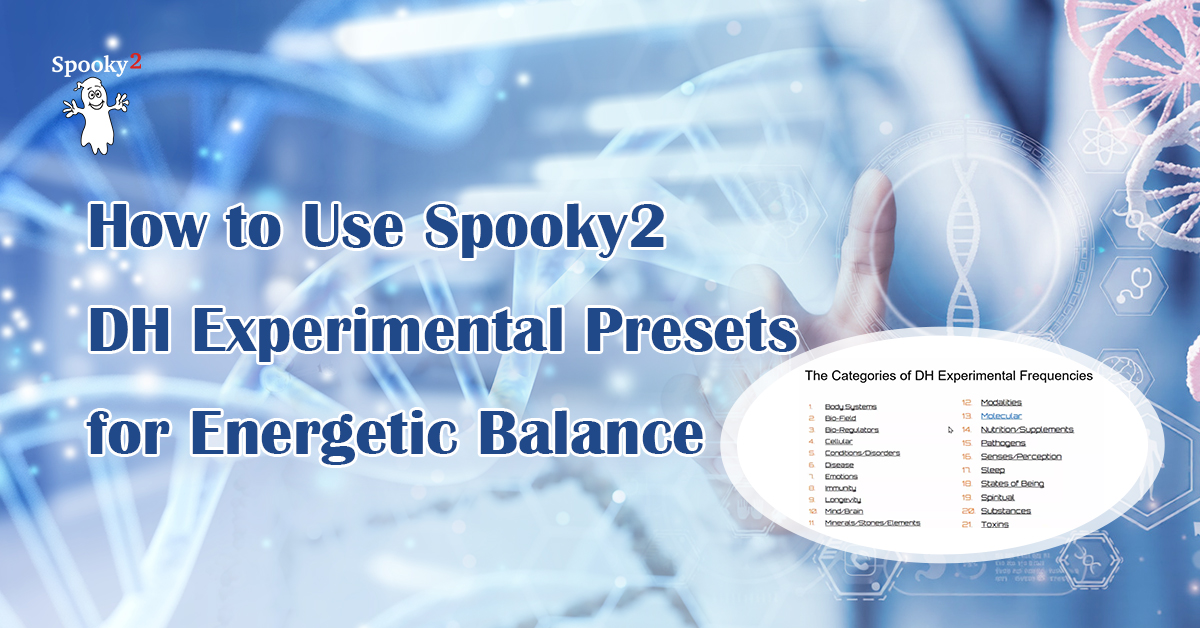
The DH (David Halliday) Experimental Presets are often described as unusual within the Spooky2 ecosystem. Unlike many conventional frequency programs that focus primarily on physical systems or pathogens, DH presets are designed to work at an energetic level first, influencing how the body organizes, responds, and adapts over time.
This guide is based on a live instructor-led training session and focuses on practical application. This article explains how to use them correctly, how to combine them with other Spooky2 programs, and how experienced users structure DH presets for long-term support. The current DH Experimental Presets package can be downloaded here.
How DH Presets Are Commonly Used Today
Based on current user practice and instructor guidance, DH presets are used in three main ways:
- As a background energetic support, running continuously while other programs target physical conditions
- As a preparatory phase, helping stabilize the energetic system before intensive physical frequency work
- As focused experimentation, where users explore specific DH categories (e.g., mind, perception, emotional balance)
The instructor cautioned against using DH presets as the only method in serious physical conditions. For most cases, it works best alongside physical treatments.
A Practical Framework for Using DH Experimental Presets
Step 1: Always Start with DH Presets 1–6 (The Energetic Foundation)
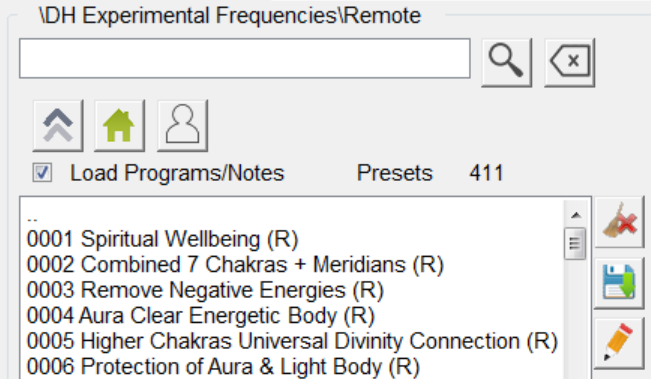
One of the clearest operational recommendations in the training was to treat DH presets 1–6 as an energetic equivalent of Terrain. The first six presets are there to set the energetic system right. They’re not optional if you want the other DH frequencies to work properly.
Practical setup:
- Chain DH Presets 1–6
- Run them: In Remote mode, ideally 24/7 or continuously in the background while other programs run
Many users run these six presets indefinitely on a dedicated Remote generator. A step-by-step demonstration of how to create and save a chain preset is available in the video tutorial.
Step 2: Choose Output Methods Intentionally
DH presets can be delivered through all Spooky2 output methods, but the choice of delivery matters.
Commonly used options for DH presets:
-
Remote
Ideal for long-duration, low-effort energetic support
Suitable for 24/7 background use -
Scalar
Often considered especially compatible with DH presets
Useful when focusing on energetic or pre-physical systems -
Contact or Coil
Used when DH presets overlap with physical symptoms or localized discomfort
The instructor also shared an advanced Remote technique: Using a BNC extension cable to place the Remote unit near the upper left arm, which may introduce energetic information more directly into the field.
-
All Product, Beginner Frequency Healing Rife Machine Kits, Frequency Healing Rife Machine Kits, Spooky2 New User Kits, Spooky2 Portable Kits, Spooky2 XM Generator Frequency Healing Rife Machine Kits
Spooky2 XM Generator Portable Starter’s Kit
 All Product, Beginner Frequency Healing Rife Machine Kits, Frequency Healing Rife Machine Kits, Spooky2 New User Kits, Spooky2 Portable Kits, Spooky2 XM Generator Frequency Healing Rife Machine Kits
Spooky2 XM Generator Portable Starter’s Kit
This kit has everything you need to set up your first Spooky2 rig.
The Spooky2 system is powerful, but it can also be confusing, with plenty of options and accessories available. Therefore, we have put everything you need into one convenient package. It is enough for you to start your first Spooky2 energy balancing journey.
If you are a Spooky2 beginner, you can start with this kit. It consists of one Spooky2-XM Generator, Remote mode, Contact mode, Cold Laser and Pulse Biofeedback.
Note: The Spooky2 software requires Windows.
Access Free Spooky2 Courses and Certified Trainer Services
Safe and Effective Energy Balancer
Start your body energy balancing journey with Spooky2 now! This is the best non-drug solution for your body energy balancing. We offer you a 30-day satisfaction guarantee, so you have nothing to lose.Information:
How to Use Spooky2 XM Generator Portable Starter’s Kit
Spooky2 Video Tutorial
Spooky2 Quick Guide
Why do we recommend using multiple generators?SKU: SP-1A30S-13 -
All Product, Beginner Frequency Healing Rife Machine Kits, Frequency Healing Rife Machine Kits, Spooky2 New User Kits, Spooky2 Portable Kits, Spooky2 XM Generator Frequency Healing Rife Machine Kits
Spooky2 XM Generator Portable Essential Kit
 All Product, Beginner Frequency Healing Rife Machine Kits, Frequency Healing Rife Machine Kits, Spooky2 New User Kits, Spooky2 Portable Kits, Spooky2 XM Generator Frequency Healing Rife Machine Kits
Spooky2 XM Generator Portable Essential Kit
Spooky2 XM Generator Portable Essential Kit is the basic kit for helping with acute problems, chronic problems or serious problems.
The Spooky2 system is powerful, but it can also be confusing, with plenty of options and accessories available. Therefore, we have put everything you need into one convenient package. This kit is sufficient enough for you to start your first Spooky2 energy balancing journey.
It includes two Spooky2-XM Generators, Remote mode, Contact mode, Cold Laser and Pulse Biofeedback. One generator is for killing pathogens, bacteria and viruses. The other generator is for running detoxification programs to address any potential detoxification issue.
For multiple Spooky2-XM Generators connection, you can order a Spooky2 10 Port USB 3.0 Hub or a Spooky2 Quad 5V Power Supply.
Note:
- At Spooky2, we are always trying our best to protect our environment. We have updated our kit packaging to a more sustainable portable case. You will receive an $18 USD discount when purchasing this portable kit.
- The Spooky2 software requires Windows.
Access Free Spooky2 Courses and Certified Trainer Services
Safe and Effective Energy Balancer
Start your body energy balancing journey with Spooky2 now! This is the best non-drug solution for your body energy balancing. We offer you a 30-day satisfaction guarantee, so you have nothing to lose.Information:
How to Use Spooky2 XM Generator Portable Essential Kit
Spooky2 Video Tutorial
Spooky2 Quick Guide
Why do we recommend using multiple generators?SKU: SP-1A30S-12 -
All Product, Beginner Frequency Healing Rife Machine Kits, Frequency Healing Rife Machine Kits, Spooky2 GeneratorX Pro Frequency Healing Rife Machine Kits, Spooky2 New User Kits, Spooky2 Portable Kits
Spooky2 Portable GeneratorX Pro Essential Kit
 All Product, Beginner Frequency Healing Rife Machine Kits, Frequency Healing Rife Machine Kits, Spooky2 GeneratorX Pro Frequency Healing Rife Machine Kits, Spooky2 New User Kits, Spooky2 Portable Kits
Spooky2 Portable GeneratorX Pro Essential Kit
GeneratorX Pro(GX Pro) is the world’s most powerful Rife generator, brimming with the most advanced features.
Each GX Pro contains 2 function generators, which is a total of 4 frequency outputs plus a full Biofeedback system.
GX Pro can run at 40 MHz with any waveform, and can also load up to 30 programs from Spooky2 software. The most important feature of the GX Pro is its ability to run standalone without needing to stay connected to a computer. Simply load the programs onto the device using a computer, and it will continue to operate independently.
If you need to help with acute problems, chronic problems or serious problems, Spooky2 Portable GeneratorX Pro Essential Kit will be the best way to start.
Note:
- At Spooky2, we are always trying our best to protect our environment. We have updated our kit packaging to a more sustainable portable case.
- The Spooky2 software requires Windows.
Access Free Spooky2 Courses and Certified Trainer Services
Safe and Effective Energy Balancer
Start your body energy-balancing journey with Spooky2 now! This is the best non-drug solution for your body’s energy balance. We offer you a 30-day satisfaction guarantee, so you have nothing to lose but your conditions.Information:
How to Use Spooky2 Portable GeneratorX Pro Essential Kit
Spooky2 Video Tutorial
Spooky2 GeneratorX Pro Users Guide
How to Do GX Pro TENS Scan
The Differences Between GX Pro and the XM GeneratorSKU: SP-1B30S-15 -
All Product, Beginner Frequency Healing Rife Machine Kits, Frequency Healing Rife Machine Kits, Spooky2 Central Plasma Rife Machine Kits, Spooky2 New User Kits
Spooky2 Portable Central GeneratorX Pro Kit
 All Product, Beginner Frequency Healing Rife Machine Kits, Frequency Healing Rife Machine Kits, Spooky2 Central Plasma Rife Machine Kits, Spooky2 New User Kits
Spooky2 Portable Central GeneratorX Pro Kit
Spooky2 Central is currently the MOST powerful Rife machine. It’s a modern-day Rife system that applies Royal Rife’s original frequencies directly without a carrier. This method was originally used by Royal Rife when saving 16 patients back in 1934.
This kit combines Spooky2 GeneratorX Pro Essential Kit and Spooky2 Central Single Generator Kit together with an additional USB filter cable.
Note: The Spooky2 software requirement is a Windows System.
Safe and Effective Energy Balancer
Start your body energy balancing journey with Spooky2 now! It is your best drug-free solution for bringing back your good health. Also, we offer you a 30-day satisfaction guarantee, so you have nothing to lose.Information:
Access Free Spooky2 Courses and Certified Trainer Services
How to Use Spooky2 Portable Central GeneratorX Pro Kit
Spooky2 Video Tutorial
Advantages of Spooky2 Central Kit
The Differences Between Spooky2 Phanotron Tube and Spooky2 Straight TubeSKU: n/a
-
All Product, Beginner Frequency Healing Rife Machine Kits, Frequency Healing Rife Machine Kits, Spooky2 Scalar Energy Healing Kits
Spooky2 Scalar GeneratorX Pro Essential Kit
 All Product, Beginner Frequency Healing Rife Machine Kits, Frequency Healing Rife Machine Kits, Spooky2 Scalar Energy Healing Kits
Spooky2 Scalar GeneratorX Pro Essential Kit
Spooky2 Scalar GX Pro Essential Kit provides a full scalar system for the healing scalar energy and scalar biofeedback scan.
Want to know if Spooky2 Scalar really works for you? View our verified testimonials here.
Access Free Spooky2 Courses and Certified Trainer Services
Safe and Effective Healing Treatment
Start your body healing journey with Spooky2 Scalar now! This is the best non-drug solution for your body healing. Also, we offer you a 30-day satisfaction guarantee, so you have nothing to lose but your conditions.SKU: n/a -
All Product, Frequency Healing Rife Machine Upgrade Kits, Spooky2 Scalar Energy Healing Kits
Spooky2 Scalar
 All Product, Frequency Healing Rife Machine Upgrade Kits, Spooky2 Scalar Energy Healing Kits
Spooky2 Scalar
Spooky2 Scalar is the first scalar energy balancing device to provide three different methods of transmitting scalar energy balancing waves: pure scalar, molecular scalar and Rife scalar.
The fields produced by Spooky2 Scalar are strong. We use analog circuitry to ensure a pure signal, and the signal can be either molecular or frequency modulated using low or high frequencies.
Note:
Spooky2 Scalar Digitizer allows you to do a biofeedback scan using Spooky2 Scalar.
Extended length link cable for Spooky2 Scalar. Ideal for helping with larger areas.Safe and Effective Energy Balancer
Start your body energy balancing journey with Spooky2 now! This is the best non-drug solution for your body energy balancing. Also, we offer you a 30-day satisfaction guarantee, so you have nothing to lose.SKU: n/a
Step 3: Combine DH Presets with Physical Programs
DH presets are not a replacement for pathogen, organ, or system-specific frequency sets. If you’ve got a physical condition, you should still be running physical programs. DH works alongside them, not instead of them.
A commonly suggested structure:
- DH Presets 1–6 running continuously on Remote
- Physical programs (e.g. organs, pathogens, inflammation) run via Contact, Coil, Plasma, or Laser
- Additional DH presets chosen based on emotional, neurological, or energetic needs
Step 4: Selecting Specific DH Presets
DH presets are organized into categories such as:
- Mind & Brain
- Emotional Balance
- Perception & Sensory Processing
- Spiritual & Energetic Systems
The instructor recommended choosing presets based on life demand, not just diagnosis: Ask yourself what your condition is demanding from you right now. Is it physical strength? Emotional stability? Mental clarity? Rather than running many presets at once, he advised:
- Select 1–3 relevant DH presets
- Observe responses over several days
- Adjust gradually
Step 5: Voltage, Duration, and Safety Considerations
For Contact mode, voltage matters. Energetic effects generally require less power than killing physical organisms.
General guidance shared:
- Lower voltages may suit emotional or energetic presets
- Higher voltages may suit more physical applications
- Remote mode requires no voltage adjustment
For Remote chains:
- Maximum recommended chain length: 4 hours
- Shorter chains allow more frequency “hits” per day
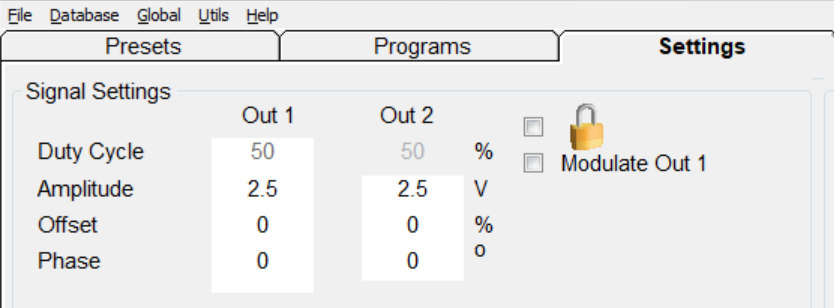
Click the amplitude value (e.g., 2.5) and manually adjust it to 1.0, 1.5, or 2.0, then fine-tune based on how your body responds.
Real-World Usage Scenarios
Scenario 1: Long-Term Fatigue or Low Mood
Goal: Improve energetic resilience and emotional stability. Emotional and energetic shifts are often subtle. Give them time.
- DH Presets 1–6 on Remote continuously
- One or two DH presets related to emotional or neurotransmitter balance
- Optional physical programs if indicated
Scenario 2: Physical Condition with Slow Recovery
Goal: Support physical healing by stabilizing the energetic environment. DH doesn’t replace physical work. It helps the body respond better to it.
- DH Presets 1–6 on Remote
- Physical programs delivered via Contact, Coil, or Plasma
- Optional Scalar delivery for DH presets
Scenario 3: High Stress or Mental Overload
Goal: Reduce nervous system strain and improve clarity. Lower power often works better for energetic and mental presets.
- DH Presets 1–6 on Remote
- One DH preset focused on mind, perception, or nervous system balance
- Lower intensity, Remote-only delivery
Final Notes on Using DH Presets Effectively
DH Experimental Presets are not about fast results. They are tools for long-term energetic support, best used with patience and careful observation. As the instructor summarized, “Experiment carefully. Listen to your body. Don’t rush it.”
Used thoughtfully, DH presets can become a valuable part of a structured Spooky2 practice—supporting balance, resilience, and whole-system coherence over time.
If you would like to see how DH Experimental Presets are explained and demonstrated in real time, you can watch the full training session here:
