


Grey hair is a natural sign of aging, with 50% of people having at least 50% grey hair by age 50. However, premature greying affects over 30% of individuals in their 30s. While genetics play a major role, factors like stress, poor nutrition, and vitamin deficiencies (such as B12 and D3) can accelerate the process. Research has shown that stress can deplete melanocyte stem cells, leading to faster greying. The good news is that Spooky2’s frequency therapy offers a natural, non-invasive solution to reverse grey hair and promote healthy hair growth. In this blog, we’ll explore how Spooky2 can help restore your natural hair color and encourage thicker, healthier hair.
Understanding the Causes of Grey Hair and Hair Loss
Grey hair is caused by a decrease in the production of melanin, the pigment responsible for the color of our hair. As we age, the melanocytes in hair follicles stop producing melanin, resulting in grey or white hair. Genetics play a significant role in determining when you’ll experience grey hair, but other factors can contribute to premature greying as well.
Key Factors in Premature Grey Hair:
- Genetics: If your family members experienced early grey hair, you’re more likely to experience it as well due to genetic factors, particularly involving the IRF4 gene.
- Stress: Chronic stress can accelerate the greying process by damaging melanocytes and increasing oxidative stress in the body.
- Vitamin Deficiencies: A lack of essential vitamins like B12, D3, and iron can interfere with melanin production.
- Environmental Factors: Smoking, pollution, and exposure to toxins can damage hair follicles, leading to premature greying.
In addition to grey hair, many people also face hair thinning and loss, often due to stress, hormonal changes, and lifestyle factors. Fortunately, Spooky2’s frequency therapy can address both grey hair and hair loss effectively.
How Spooky2’s Frequency Therapy Works
Spooky2 uses frequency therapy to target the root causes of grey hair and hair loss. Unlike chemical treatments that may only provide temporary results, Spooky2 works naturally by restoring balance to the body’s systems. By addressing underlying factors such as oxidative stress, nutrient deficiencies, and follicle health, these programs help promote healthier, stronger, and more vibrant hair.
To achieve optimal results, Spooky2 offers a range of targeted frequency programs, categorized as follows:
Greying hair is often linked to melanin depletion, oxidative stress, and nutrient deficiencies. These programs help restore hair pigmentation and prevent further greying:
- Hair Pigmentation Restoration
-
- Return Grey Hair to Natural Colour (General) – Stimulates melanin production to restore natural hair color.
- Antioxidant Effect (BIO) – Protects against oxidative stress to preserve melanin.
- Vitamin B12 Deficiency (XTRA) – Supports melanin production by addressing B12 deficiency.
- Vitamin Deficiency (General) – Balances essential vitamins for healthy hair pigmentation.
-
DNA & Cellular Repair
- DNA Heal (XTRA) – Repairs DNA damage that contributes to greying and aging.
Healthy hair growth depends on strong, well-nourished hair follicles. These programs work to improve follicle function and stimulate new hair growth:
-
Hair Growth & Follicle Health
- Hair-regulation of Loss (BIO) – Regulates hair loss and strengthens follicles.
- Hair Follicles (XTRA) – Rejuvenates hair follicles using Frequency Specific Microcurrent (FSM).
- Hair Growth Stimulation (RUSS) – Reactivates dormant follicles for new hair growth.
- Hair Losing (XTRA) – Addresses hair loss conditions like alopecia and scalp health.
-
Energy & Wellbeing Support (Pre-requisites)
- Spiritual Wellbeing and Chakra & Meridian frequency sets should be run first to enhance overall energetic balance.
Step-by-Step Guide to Using Spooky2 for Hair Restoration
Here’s how you can use Spooky2 to reverse grey hair and stimulate hair growth:
- Set Up Your Spooky2 Hardware: Use the Spooky2-XM Generator or GeneratorX with Remote mode.
- Load the Preset: Open the Spooky2 software, go to Preset Collections, then select DH Experimental Frequencies > Remote > 0404 Return Grey Hair to Natural Colour [General] (no Meds) (R).
- Save Custom Programs: If you want to create a personalized treatment, save your custom program (e.g., Reverse Grey Hair) for easier future access.
- Start the Program: Go to the Control tab and click Start. Let the frequencies work on restoring your natural hair color and promoting hair growth.
For more targeted results, continue using the 0404 Return Grey Hair to Natural Colour (R) preset under DH Experimental Frequencies to enhance the effects.
Spooky2’s frequency therapy can help address these underlying causes, promoting healthier hair growth and restoring melanin production. For a deeper dive into what causes grey hair and how Spooky2 can reverse it, be sure to check out the Spooky2 Grey Hair Guide: What, Why & How to Reverse, which offers further insights into how frequency therapy can benefit your hair.
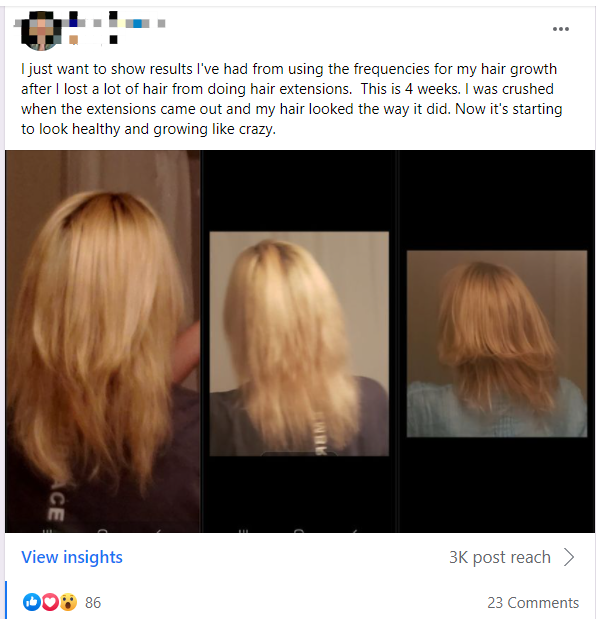
Real Success Stories from Spooky2 Users

Recommended Kits
-
All Product, Beginner Frequency Healing Rife Machine Kits, Frequency Healing Rife Machine Kits, Spooky2 New User Kits, Spooky2 Portable Kits, Spooky2 XM Generator Frequency Healing Rife Machine Kits
Spooky2 XM Generator Portable Starter’s Kit
 All Product, Beginner Frequency Healing Rife Machine Kits, Frequency Healing Rife Machine Kits, Spooky2 New User Kits, Spooky2 Portable Kits, Spooky2 XM Generator Frequency Healing Rife Machine Kits
Spooky2 XM Generator Portable Starter’s Kit
This kit has everything you need to set up your first Spooky2 rig.
The Spooky2 system is powerful, but it can also be confusing, with plenty of options and accessories available. Therefore, we have put everything you need into one convenient package. It is enough for you to start your first Spooky2 energy balancing journey.
If you are a Spooky2 beginner, you can start with this kit. It consists of one Spooky2-XM Generator, Remote mode, Contact mode, Cold Laser and Pulse Biofeedback.
Note: The Spooky2 software requires Windows.
Access Free Spooky2 Courses and Certified Trainer Services
Safe and Effective Energy Balancer
Start your body energy balancing journey with Spooky2 now! This is the best non-drug solution for your body energy balancing. We offer you a 30-day satisfaction guarantee, so you have nothing to lose.Information:
How to Use Spooky2 XM Generator Portable Starter’s Kit
Spooky2 Video Tutorial
Spooky2 Quick Guide
Why do we recommend using multiple generators?SKU: SP-1A30S-13 -
All Product, Beginner Frequency Healing Rife Machine Kits, Frequency Healing Rife Machine Kits, Spooky2 New User Kits, Spooky2 Portable Kits, Spooky2 XM Generator Frequency Healing Rife Machine Kits
Spooky2 XM Generator Portable Essential Kit
 All Product, Beginner Frequency Healing Rife Machine Kits, Frequency Healing Rife Machine Kits, Spooky2 New User Kits, Spooky2 Portable Kits, Spooky2 XM Generator Frequency Healing Rife Machine Kits
Spooky2 XM Generator Portable Essential Kit
Spooky2 XM Generator Portable Essential Kit is the basic kit for helping with acute problems, chronic problems or serious problems.
The Spooky2 system is powerful, but it can also be confusing, with plenty of options and accessories available. Therefore, we have put everything you need into one convenient package. This kit is sufficient enough for you to start your first Spooky2 energy balancing journey.
It includes two Spooky2-XM Generators, Remote mode, Contact mode, Cold Laser and Pulse Biofeedback. One generator is for killing pathogens, bacteria and viruses. The other generator is for running detoxification programs to address any potential detoxification issue.
For multiple Spooky2-XM Generators connection, you can order a Spooky2 10 Port USB 3.0 Hub or a Spooky2 Quad 5V Power Supply.
Note:
- At Spooky2, we are always trying our best to protect our environment. We have updated our kit packaging to a more sustainable portable case. You will receive an $18 USD discount when purchasing this portable kit.
- The Spooky2 software requires Windows.
Access Free Spooky2 Courses and Certified Trainer Services
Safe and Effective Energy Balancer
Start your body energy balancing journey with Spooky2 now! This is the best non-drug solution for your body energy balancing. We offer you a 30-day satisfaction guarantee, so you have nothing to lose.Information:
How to Use Spooky2 XM Generator Portable Essential Kit
Spooky2 Video Tutorial
Spooky2 Quick Guide
Why do we recommend using multiple generators?SKU: SP-1A30S-12 -
All Product, Beginner Frequency Healing Rife Machine Kits, Frequency Healing Rife Machine Kits, Spooky2 GeneratorX Pro Frequency Healing Rife Machine Kits, Spooky2 New User Kits, Spooky2 Portable Kits
Spooky2 Portable GeneratorX Pro Essential Kit
 All Product, Beginner Frequency Healing Rife Machine Kits, Frequency Healing Rife Machine Kits, Spooky2 GeneratorX Pro Frequency Healing Rife Machine Kits, Spooky2 New User Kits, Spooky2 Portable Kits
Spooky2 Portable GeneratorX Pro Essential Kit
GeneratorX Pro(GX Pro) is the world’s most powerful Rife generator, brimming with the most advanced features.
Each GX Pro contains 2 function generators, which is a total of 4 frequency outputs plus a full Biofeedback system.
GX Pro can run at 40 MHz with any waveform, and can also load up to 30 programs from Spooky2 software. The most important feature of the GX Pro is its ability to run standalone without needing to stay connected to a computer. Simply load the programs onto the device using a computer, and it will continue to operate independently.
If you need to help with acute problems, chronic problems or serious problems, Spooky2 Portable GeneratorX Pro Essential Kit will be the best way to start.
Note:
- At Spooky2, we are always trying our best to protect our environment. We have updated our kit packaging to a more sustainable portable case.
- The Spooky2 software requires Windows.
Access Free Spooky2 Courses and Certified Trainer Services
Safe and Effective Energy Balancer
Start your body energy-balancing journey with Spooky2 now! This is the best non-drug solution for your body’s energy balance. We offer you a 30-day satisfaction guarantee, so you have nothing to lose but your conditions.Information:
How to Use Spooky2 Portable GeneratorX Pro Essential Kit
Spooky2 Video Tutorial
Spooky2 GeneratorX Pro Users Guide
How to Do GX Pro TENS Scan
The Differences Between GX Pro and the XM GeneratorSKU: SP-1B30S-15 -
All Product, Beginner Frequency Healing Rife Machine Kits, Frequency Healing Rife Machine Kits, Spooky2 Central Plasma Rife Machine Kits, Spooky2 New User Kits
Spooky2 Portable Central GeneratorX Pro Kit
 All Product, Beginner Frequency Healing Rife Machine Kits, Frequency Healing Rife Machine Kits, Spooky2 Central Plasma Rife Machine Kits, Spooky2 New User Kits
Spooky2 Portable Central GeneratorX Pro Kit
Spooky2 Central is currently the MOST powerful Rife machine. It’s a modern-day Rife system that applies Royal Rife’s original frequencies directly without a carrier. This method was originally used by Royal Rife when saving 16 patients back in 1934.
This kit combines Spooky2 GeneratorX Pro Essential Kit and Spooky2 Central Single Generator Kit together with an additional USB filter cable.
Note: The Spooky2 software requirement is a Windows System.
Safe and Effective Energy Balancer
Start your body energy balancing journey with Spooky2 now! It is your best drug-free solution for bringing back your good health. Also, we offer you a 30-day satisfaction guarantee, so you have nothing to lose.Information:
Access Free Spooky2 Courses and Certified Trainer Services
How to Use Spooky2 Portable Central GeneratorX Pro Kit
Spooky2 Video Tutorial
Advantages of Spooky2 Central Kit
The Differences Between Spooky2 Phanotron Tube and Spooky2 Straight TubeSKU: n/a
Conclusion
Spooky2 offers a powerful, natural approach to reversing grey hair and promoting healthy hair growth through frequency therapy. By targeting the underlying causes of premature greying and hair loss, such as DNA damage, stress, and nutrient deficiencies, Spooky2 can help restore your natural hair color and stimulate thicker, healthier hair. Whether you’re looking to reverse grey hair or simply enhance your overall hair health, Spooky2 provides a safe, non-invasive solution. Give it a try and experience the benefits of frequency therapy for yourself.

Which preset shell is best for these programs mentioned above for hair loss?
Hair-regulation of Loss (BIO)
Hair Follicles (XTRA)
Hair Growth Stimulation (RUSS)
Hair Losing (XTRA)
Dear Robert,
Thank you for your inquiry! For the hair loss programs you mentioned, we recommend using the 0404 Return Grey Hair to Natural Colour [General] (no Meds) (R) preset for Remote mode. This preset is well-suited for hair restoration and follicle stimulation.
If you have any questions or need further assistance, please contact us at support@spooky2-mall.com.
Best regards,
Spooky2 Support Team
I have the spooky2 xm generator. In my software, I do not see the DH Experimental frequencies under the Preset tab. Is the preset tab the same as preset collections? When I search for return grey hair to natural color nothing comes up. Thanks for your help!
Dear Cindy,
Thank you for reaching out! The DH Experimental frequencies are not included by default in the software. You’ll need to download the DH Experimental Presets separately from the following link:
🔗 [Download DH Experimental Presets]https://www.spooky2.com/resources/DH_Experimental_Presets_20230717.zip
After downloading, extract the file and place the presets into the appropriate Spooky2 folder. You should then be able to find them under the Preset tab in your software.
If you need further assistance, feel free to ask!
Best regards,
Spooky2 Team
Awesome! That worked! Thank you so much!! Is there a guide to know how long and how often to run programs?
Dear Cindy,
Thank you for your kind words! We’re delighted to hear that it worked for you! 😊
Since everyone responds differently, there is no strict time limit for running programs in Remote mode. We recommend running the program until you notice a clear response from your body. Pay attention to how you feel, and adjust accordingly to find what works best for you.
If you have any further questions, feel free to reach out. We’re happy to help!
Best regards,
Spooky2 Team