


Spooky2 Software is one of the most powerful and versatile tools in the world of frequency healing. With over 60,000 programs, it offers a comprehensive range of frequency settings to address a variety of health concerns. Whether you’re a beginner or an experienced user, understanding how Presets and Programs work can help you unlock the full potential of Spooky2. In this blog, we will explore the differences between Presets and Programs, provide an overview of how they work, and demonstrate the unique features of Spooky2 Software. Let’s dive in!
What Are Spooky2 Programs and Presets
At the heart of Spooky2 Software are two key features: Programs and Presets. While they both involve using frequencies to treat specific health concerns, they serve different purposes.
| Feature | Program | Preset |
|---|---|---|
| Definition | A collection of frequencies for specific conditions. | A pre-configured collection of programs for easy use. |
| Customization | Fully customizable; users can select and match programs to their needs. | Minimal customization; everything is pre-selected for convenience. |
| Analogy | Like selecting specific medications for your health condition. | Like receiving a prescription that’s already prepared for you. |
| Example | Covers a wide range of conditions, targeting various health issues. | Presets like "0012 Teeth & Gums Decay & Restoration," "0002 Combined 7 Chakras + Meridians," "0038 Immune System Super Booster," etc. |
Programs are ideal for users who want to customize their treatments and experiment with different frequencies.
Presets, on the other hand, are designed for those who want a ready-made solution with minimal configuration required.


How to Use Spooky2 Presets: A Simple Guide
Spooky2 presets are ready-to-use collections of frequencies designed for specific health concerns. They’re perfect for users who want quick and effective treatments without the need to manually configure settings. Let’s dive into how to use the 0002 Combined 7 Chakras + Meridians (R) for Remote preset as an example.
Steps to Use 0002 Combined 7 Chakras + Meridians (R)
-
Open Spooky2 Software: Launch the Spooky2 software on your computer.
-
Select the Preset:
-
Navigate to Preset Collections > DH Experimental Frequencies > Remote.
-
Choose 0002 Combined 7 Chakras + Meridians (R).
-
-
Choose Your Mode:
-
While Remote is the default, you can select other modes like Contact or PEMF based on your preference.
-
-
Connect the Remote:
-
If using a DNA sample, connect the remote to the generator and the ‘BN’ port of the Spooky2 Boost.
-
-
Run the Treatment: Start the preset and, for best results, run the full Wellbeing frequency set beforehand.
For more details on DH Experimental Presets, check out these resources:



By following these steps, you can quickly and easily use Spooky2 Presets to target your health concerns with minimal effort.
How to Create Your Programs and Presets
Spooky2 offers excellent customization options for those who wish to create their healing protocols:
Choosing a Program
If you know the specific frequencies you need (e.g., 40Hz, 80Hz, 120Hz), you can easily create a program tailored to your needs. For more guidance on selecting the right program, check out How to Choose a Program That Suits You the Best.
Creating a Custom Preset
If you find several programs that work well together, you can combine them into a preset. This allows you to run them in sequence automatically, saving you time and effort.
Tutorial: How to Make Your Own Presets out of Shell Presets.
Creating a Preset Chain
For more advanced users, creating a preset chain allows you to run multiple presets (e.g., a detox followed by a healing preset) in one continuous process.
Tutorial: How to Create a Preset Chain.


Real Success Stories from Spooky2 Users
Spooky2 users have experienced remarkable health improvements with DH Experimental Frequencies. Here are four success stories:
- Oral Health Recovery with DH 0012
One user resolved tooth decay, gum bleeding, and plaque using the DH 0012 preset, even from 2000km away. The results included pain relief and the gradual healing of tooth decay.
Read more: Remote Miracle: Curing Dental Problems with DH 0012 Preset

- Managing Digestive Health with DH Frequencies
After struggling with ulcerative colitis, a user found relief with DH frequencies for Crohn’s, ending persistent flare-ups even with hormonal triggers.
Read more: DH Frequencies Keep Digestive Health Under Control.

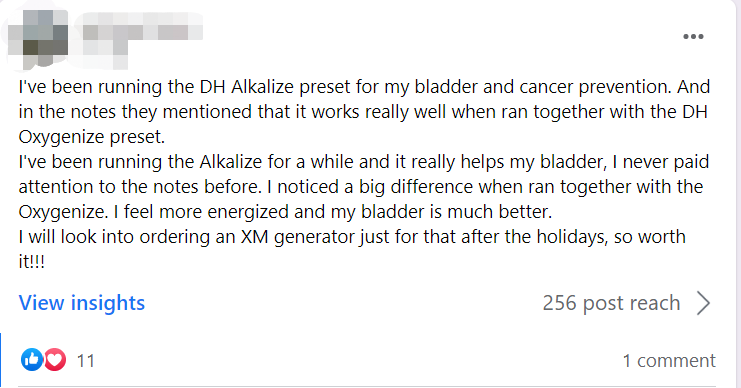
- Bladder and Wellness Support with DH Alkalize and Oxygenize
A user combined the DH Alkalize and DH Oxygenize presets for bladder health and energy. They felt increased vitality and noticed improved bladder health.
Read more: DH Alkalize and Oxygenize Presets for Bladder and Wellness Support.
- Back Pain Relief with DH Frequencies
A user with severe back pain found 98% relief after 28 hours of using DH back pain and muscle healing presets.
Read more: Back Pain Relief with DH Frequencies.

Online Training: Overview of Spooky2 Software
To deepen your understanding of Spooky2 Software, check out the Spooky2 Online Training Course, which covers:
- Overview of Spooky2 Software and Menu Tabs
- Detailed explanations of Preset, Program, Control, and System tabs
- Live demos and Q&A sessions
Course Link: Spooky2 Online Training Course – Spooky2 Software.
Recommended Kits
-
All Product, Beginner Frequency Healing Rife Machine Kits, Frequency Healing Rife Machine Kits, Spooky2 New User Kits, Spooky2 Portable Kits, Spooky2 XM Generator Frequency Healing Rife Machine Kits
Spooky2 XM Generator Portable Starter’s Kit
 All Product, Beginner Frequency Healing Rife Machine Kits, Frequency Healing Rife Machine Kits, Spooky2 New User Kits, Spooky2 Portable Kits, Spooky2 XM Generator Frequency Healing Rife Machine Kits
Spooky2 XM Generator Portable Starter’s Kit
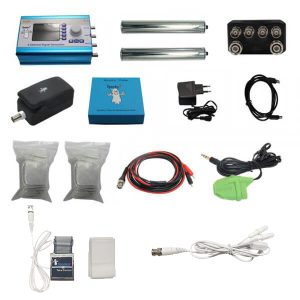
This kit has everything you need to set up your first Spooky2 rig.
The Spooky2 system is powerful, but it can also be confusing, with plenty of options and accessories available. Therefore, we have put everything you need into one convenient package. It is enough for you to start your first Spooky2 energy balancing journey.
If you are a Spooky2 beginner, you can start with this kit. It consists of one Spooky2-XM Generator, Remote mode, Contact mode, Cold Laser and Pulse Biofeedback.
Note: The Spooky2 software requires Windows.
Access Free Spooky2 Courses and Certified Trainer Services
Safe and Effective Energy Balancer
Start your body energy balancing journey with Spooky2 now! This is the best non-drug solution for your body energy balancing. We offer you a 30-day satisfaction guarantee, so you have nothing to lose.Information:
How to Use Spooky2 XM Generator Portable Starter’s Kit
Spooky2 Video Tutorial
Spooky2 Quick Guide
Why do we recommend using multiple generators?SKU: SP-1A30S-13 -
All Product, Beginner Frequency Healing Rife Machine Kits, Frequency Healing Rife Machine Kits, Spooky2 New User Kits, Spooky2 Portable Kits, Spooky2 XM Generator Frequency Healing Rife Machine Kits
Spooky2 XM Generator Portable Essential Kit
 All Product, Beginner Frequency Healing Rife Machine Kits, Frequency Healing Rife Machine Kits, Spooky2 New User Kits, Spooky2 Portable Kits, Spooky2 XM Generator Frequency Healing Rife Machine Kits
Spooky2 XM Generator Portable Essential Kit
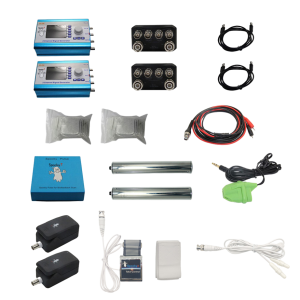
Spooky2 XM Generator Portable Essential Kit is the basic kit for helping with acute problems, chronic problems or serious problems.
The Spooky2 system is powerful, but it can also be confusing, with plenty of options and accessories available. Therefore, we have put everything you need into one convenient package. This kit is sufficient enough for you to start your first Spooky2 energy balancing journey.
It includes two Spooky2-XM Generators, Remote mode, Contact mode, Cold Laser and Pulse Biofeedback. One generator is for killing pathogens, bacteria and viruses. The other generator is for running detoxification programs to address any potential detoxification issue.
For multiple Spooky2-XM Generators connection, you can order a Spooky2 10 Port USB 3.0 Hub or a Spooky2 Quad 5V Power Supply.
Note:
- At Spooky2, we are always trying our best to protect our environment. We have updated our kit packaging to a more sustainable portable case. You will receive an $18 USD discount when purchasing this portable kit.
- The Spooky2 software requires Windows.
Access Free Spooky2 Courses and Certified Trainer Services
Safe and Effective Energy Balancer
Start your body energy balancing journey with Spooky2 now! This is the best non-drug solution for your body energy balancing. We offer you a 30-day satisfaction guarantee, so you have nothing to lose.Information:
How to Use Spooky2 XM Generator Portable Essential Kit
Spooky2 Video Tutorial
Spooky2 Quick Guide
Why do we recommend using multiple generators?SKU: SP-1A30S-12 -
All Product, Beginner Frequency Healing Rife Machine Kits, Frequency Healing Rife Machine Kits, Spooky2 GeneratorX Pro Frequency Healing Rife Machine Kits, Spooky2 New User Kits, Spooky2 Portable Kits
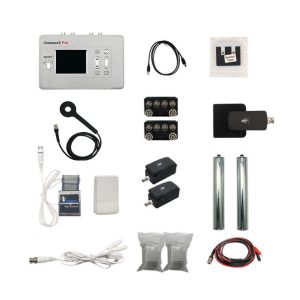
Spooky2 Portable GeneratorX Pro Essential Kit
 All Product, Beginner Frequency Healing Rife Machine Kits, Frequency Healing Rife Machine Kits, Spooky2 GeneratorX Pro Frequency Healing Rife Machine Kits, Spooky2 New User Kits, Spooky2 Portable Kits
Spooky2 Portable GeneratorX Pro Essential Kit
GeneratorX Pro(GX Pro) is the world’s most powerful Rife generator, brimming with the most advanced features.
Each GX Pro contains 2 function generators, which is a total of 4 frequency outputs plus a full Biofeedback system.
GX Pro can run at 40 MHz with any waveform, and can also load up to 30 programs from Spooky2 software. The most important feature of the GX Pro is its ability to run standalone without needing to stay connected to a computer. Simply load the programs onto the device using a computer, and it will continue to operate independently.
If you need to help with acute problems, chronic problems or serious problems, Spooky2 Portable GeneratorX Pro Essential Kit will be the best way to start.
Note:
- At Spooky2, we are always trying our best to protect our environment. We have updated our kit packaging to a more sustainable portable case.
- The Spooky2 software requires Windows.
Access Free Spooky2 Courses and Certified Trainer Services
Safe and Effective Energy Balancer
Start your body energy-balancing journey with Spooky2 now! This is the best non-drug solution for your body’s energy balance. We offer you a 30-day satisfaction guarantee, so you have nothing to lose but your conditions.Information:
How to Use Spooky2 Portable GeneratorX Pro Essential Kit
Spooky2 Video Tutorial
Spooky2 GeneratorX Pro Users Guide
How to Do GX Pro TENS Scan
The Differences Between GX Pro and the XM GeneratorSKU: SP-1B30S-15 -
All Product, Beginner Frequency Healing Rife Machine Kits, Frequency Healing Rife Machine Kits, Spooky2 Central Plasma Rife Machine Kits, Spooky2 New User Kits
Spooky2 Portable Central Plasma GeneratorX Pro Kit
 All Product, Beginner Frequency Healing Rife Machine Kits, Frequency Healing Rife Machine Kits, Spooky2 Central Plasma Rife Machine Kits, Spooky2 New User Kits
Spooky2 Portable Central Plasma GeneratorX Pro Kit
Spooky2 Central is currently the MOST powerful Rife machine. It’s a modern-day Rife system that applies Royal Rife’s original frequencies directly without a carrier. This method was originally used by Royal Rife when saving 16 patients back in 1934.
This kit combines Spooky2 GeneratorX Pro Essential Kit and Spooky2 Central Single Generator Kit together with an additional USB filter cable.
Note: The Spooky2 software requirement is a Windows System.
Safe and Effective Energy Balancer
Start your body energy balancing journey with Spooky2 now! It is your best drug-free solution for bringing back your good health. Also, we offer you a 30-day satisfaction guarantee, so you have nothing to lose.Information:
Access Free Spooky2 Courses and Certified Trainer Services
How to Use Spooky2 Portable Central GeneratorX Pro Kit
Spooky2 Video Tutorial
Advantages of Spooky2 Central Kit
The Differences Between Spooky2 Phanotron Tube and Spooky2 Straight TubeSKU: n/a -
All Product, Beginner Frequency Healing Rife Machine Kits, Frequency Healing Rife Machine Kits, Spooky2 Central Plasma Rife Machine Kits, Spooky2 New User Kits
Spooky2 Portable Central Plasma with GeneratorX Pro Kit
 All Product, Beginner Frequency Healing Rife Machine Kits, Frequency Healing Rife Machine Kits, Spooky2 Central Plasma Rife Machine Kits, Spooky2 New User Kits
Spooky2 Portable Central Plasma with GeneratorX Pro Kit
Spooky2 Central is currently the MOST powerful Rife machine. It’s a modern-day Rife system that applies Royal Rife’s original frequencies directly without a carrier. This method was originally used by Royal Rife when saving 16 patients back in 1934.
This kit combines Spooky2 GeneratorX Pro Essential Kit and Spooky2 Central Single Generator Kit together with an additional USB filter cable.
Note: The Spooky2 software requirement is a Windows System.
Safe and Effective Energy Balancer
Start your body energy balancing journey with Spooky2 now! It is your best drug-free solution for bringing back your good health. Also, we offer you a 30-day satisfaction guarantee, so you have nothing to lose.Information:
Access Free Spooky2 Courses and Certified Trainer Services
How to Use Spooky2 Portable Central GeneratorX Pro Kit
Spooky2 Video Tutorial
Advantages of Spooky2 Central Kit
The Differences Between Spooky2 Phanotron Tube and Spooky2 Straight TubeSKU: n/a
Join the Spooky2 Community
Healing is easier with support. Join our Spooky2 community to connect with other users, ask questions, and share experiences:
- The Spooky2 Forum– Get expert advice and support.

- Spooky2 Facebook Group– Read real stories and share your journey.

Conclusion
Spooky2 Software offers powerful tools for frequency healing, providing both pre-configured presets and customizable programs to address a wide range of health concerns. Whether you’re looking for a quick solution with presets or prefer to tailor your treatment, Spooky2 gives you the flexibility to explore and experiment. With over 60,000 programs, extensive customization options, and real user success stories, Spooky2 is designed to empower users in their journey to better health. By leveraging the full potential of Spooky2‘s features and learning how to use its programs and presets, you can optimize your healing experience. Dive into the world of Spooky2 today, and take control of your health!
