


Spooky2’s unique biofeedback function offers an innovative way to identify the frequencies that best resonate with you and use those results to create more personalized frequency protocols.
For many new users, however, it can be confusing at first to understand which biofeedback scan modes are compatible with the hardware they have. This article will explain the four main ways to perform a Spooky2 biofeedback scan using different hardware setups.
Four Main Biofeedback Scan Routes
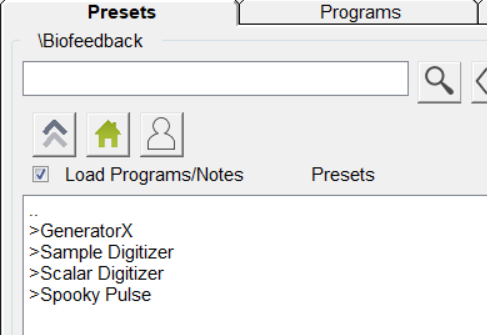
Spooky2 offers four main biofeedback scan routes: Pulse scan, TENS scan, Sample Digitizer scan, and Scalar Digitizer scan. These four categories can be found in the preset library under the Presets tab in the Spooky2 software.
Pulse Scan
Pulse Scan is the only biofeedback mode compatible with Spooky2 XM and XM Pro generators. It monitors changes in heart rate to assess how the body responds to different frequencies. During the scan, the generator delivers frequencies to the body through TENS pads, while the Spooky2 Pulse tracks changes in heart rate.
For a general-purpose biofeedback scan, you can use the General Purpose Full System Scan preset, which typically takes about 1 hour. However, the actual scan time may be longer because Spooky2 Pulse is highly sensitive to heart rate changes and may require additional time to collect enough valid readings. If you prefer shorter scan sessions, you can use the Half Scan or Quarter Scan options instead.
You can also perform Grade Scan with Grade Program Shell, or Optimise Scan with Optimise Scan Shell.
Hardware Requirements: 1 Windows laptop, 1 Spooky2 XM or XM Pro Generator, 1 Spooky2 Pulse with finger or ear clip, 1 Spooky2 Boost, 1 set of TENS cable and pads.
For detailed guidance, please refer to this blog.
TENS Scan
TENS biofeedback scan is only compatible with Spooky2 GeneratorX (Pro). It identifies frequency “hits” by transmitting frequencies through the body via TENS pads and monitoring real-time changes in electrical response. When a specific frequency resonates with a pathogen or biological stressor, it triggers a subtle shift in the electrical feedback, which the system then records as a “hit.”
For a general-purpose scan, you can use the GX General Biofeedback Scan preset, which typically takes about 20 minutes. For faster scans, you can use the GX Fast Biofeedback Scan preset instead. Other frequently used scan presets include GX High Frequency Biofeedback Scan, GX Grade Scan, GX Refine Programs, GX Hunt and Kill, and GX Scan and Run.
Hardware Requirements: 1 Windows laptop, 1 Spooky2 GeneratorX (Pro), 1 set of TENS cable and pads.
For detailed guidance, please refer to this blog.
Sample Digitizer Scan
Sample Digitizer scan is only compatible with Spooky2 GeneratorX (Pro). Unlike TENS scan, it does not require a physical connection to the user. Instead, it scans biological samples using the Spooky2 Sample Digitizer.
A typical Sample Digitizer scan using the General Biofeedback Scan (SD) preset takes approximately 40 minutes to complete. Other frequently used scan presets include Grade Scan (SD), Refine Programs (SD), Hunt And Kill (SD), Scan and Run (SD), and Fine-Resolution Biofeedback Scan (SD).
Hardware Requirements: 1 Windows laptop, 1 Spooky2 GeneratorX (Pro), 1 Spooky2 Sample Digitizer, a fresh biological sample (urine, saliva, blood, nail powder, etc.).
For detailed guidance, please refer to this blog.
Scalar Digitizer Scan
Scalar Digitizer scan is a unique biofeedback scan option that is only compatible with Spooky2 Scalar and Spooky2 GeneratorX (Pro). It does not require physical contact with the user or the use of biological samples. Instead, the subject simply sits or lies comfortably within the scalar field. Using both G1 and G2 on the GenX (Pro), the Slave preset modulates the scalar field through one generator port, while the Master preset monitors changes in the scalar field through the other port and records the response.
A typical Scalar Digitizer scan takes approximately 5–10 minutes to complete. For a general-purpose scan, you can use the Spooky2 Scalar Digitizer Master (GX) and Spooky2 Scalar Digitizer Slave (GX) presets. To perform a Hunt and Kill scan, use the Spooky2 Scalar Digitizer Hunt and Kill Master (GX) and Spooky2 Scalar Digitizer Hunt and Kill Slave (GX) presets instead.
Hardware Requirements: 1 Windows laptop, 1 Spooky2 GeneratorX (Pro), 1 Spooky2 Scalar set, 1 Scalar Digitizer, 2 BNC cables.
For detailed guidance, please refer to this blog.
Understand Your Scan Options by Generator
| Generator | Available Biofeedback Routes | Hardware Requirements | General Scan Preset & Duration |
|---|---|---|---|
| XM Pro | Pulse Scan |
|
General Purpose Full System Scan (1 hour) |
| GeneratorX Pro | TENS Scan |
|
GX General Biofeedback Scan (20 minutes) |
| Sample Digitizer Scan |
|
General Biofeedback Scan (SD) (40 minutes) | |
| Scalar Digitizer Scan |
|
Spooky2 Scalar Digitizer Master (GX) & Spooky2 Scalar Digitizer Slave (GX) (5–10 minutes) |

You state:”Due to the high ratio of pathogens within the biological sample, Spooky2 Sample Digitizer is better suited than TENS scans for finding pathogens in your body.”
Since I am addressing Lyme do you think l should do sample digitizer scan or tens scan? (I own a GX)
Hi, sample digitizer scan may be better.
I feel like the lion in the Wizzard of Oz movie~~ no ca~ca~ca~courage! I need a physical person next to me explaining slowly.
Hi, Daniel. So sorry to bring you this trouble. Any questions, please feel free to send them to support@spooky2-mall.com, or have a live chat on our mall website, our support team will reply to you ASAP and provide you with help!
Is it as effective to run a Sample Digitizer BFB and hunt and kill with that for a dog? She was diagnosed with osteosarcoma with an associated tumor. Recently she has had her leg amputated (removing the tumor), but we want to keep her cancer free. Would the sample digitizer method be a good way of doing that for BFB alone, BFB and hunt and kill, or neither in favor of using tens pads for BFB and other modalities for the scan program results?
Hi, yes, you can do this. Put some saliva of your dog on the Sample Digitizer and then run bfb scan on it. For pets, sample remote mode will be a better choice, because tens pads will limit dog’s movement. And you are welcome to send your doubts to support@spooky2-mall.com, our support team is willing to help you at any time:)
Can I run a BFB scan with just the nail sample in the remote??
If you want to run BFB Scan result, you can use Remote mode. But it is not possible to use the Remote mode for BFB Scan. Spooky2 Biofeedback Scan is a powerful tool for listening to your body and discovering what frequencies are best suited for you. To suit people with different needs, there are currently four ways to run biofeedback scans. You can learn more here: https://www.spooky2-mall.com/blog/four-ways-of-running-biofeedback-scans/
Please clarify this; “But it is not possible to use the Remote mode for BFB Scan.”
Above, you say “If you want to run BFB Scan result, you can use Remote mode.”
So, can you or not, use the remote to run a BFB scan?
Dear friend, that’s different. When you’re doing biofeedback scan, you only have the following ways to do: https://www.spooky2-mall.com/blog/four-ways-of-running-spooky2-biofeedback-scans/. And after doing bfb scan, you’ll get bfb scan results, then you need to run the results, you can choose remote mode to run it. There is a blog about what to do after get results from bfb scan: https://www.spooky2-mall.com/blog/what-do-we-do-after-we-get-results-from-biofeedback-scan-using-spooky-pulse/. Hope it helps.
Hello, I’m doing a sample BFB on my dog and I have 2 questions.
1. I was told that I should keep the sample wet/moist during the scan. However, I also remember somewhere says BFB can’t be stopped or you will have to restart from the beginning. So, how do I keep the sample moist if the scan takes many hours to complete? Do I pause the scan to rewet the sample? Or do I take the disk out to add sample without touching the preset?
2. I tried to run the sample BFB before and the scan took almost 20 hours. I’m doing the second time right now, following exactly what the video was doing. The scan is still going after 1 hour…. Am I doing anything wrong?
I’m very confused and not sure if I’m using my tools correctly. Please help and thanks a million!!
Dear Catherine, typically, wet samples stay fresh for less than eight hours, and if you are concerned about the sample, then you may choose to use fingernail powder as a sample for biofeedback scan. As for the software operation problems you encountered, you can send the detailed details in the form of photos or pictures to our email address, and our customer service will help you solve your problems. Thanks for you suppoet and understanding.
I saw in the video for running the biofeedback using TENS pads that when you run the results after, you use two boosts/remotes. Can it be done with one, or are two required? Thanks.
Hi Alexander, the use of two boosts and remotes in the video is for one to run the biofeedback results and one to run the detox. you can also choose to just run the connection to one remote to run your results. Any questions, feel free to contact us by email: support@spooky2-mall.com.
I have a suggestion. Since I’m not sure if any of the scanning systems can do this or actually do this, I’m not sure if it’s possible.
If multiple frequencies can be delivered at the same time, then start by running as many frequencies at the same time as safely possible. If there is a reaction, then run the first half of those frequencies, repeating with half the frequencies each time there is a reaction, and the other half of the frequencies if there is no reaction with the first half. You will quickly get down to 1 frequency, and a lot more quickly than testing each frequency individually. Theoretically, it may be possible to discover it may take 2 or 3 frequencies to generate a significant reaction whereas each of those frequencies may not generate much if any reaction.
Is this search method possible? Does it make sense? Is it being done already?
Hello, we do not recommend running multiple frequencies at the same time, as we cannot guarantee what effect it may have on the body. Thank you for your message.
can Sample Digitizer be used with XM Generator?
Yes, the Sample Digitizer can be used with the XM Generator. If you need further assistance or have more questions, feel free to ask!
I’m confused – I thought the Sample Digitizer could only be used with the Gen XPro? It even states in red on the Spooky2 SD product page “The Sample Digitizer can only be used with the Generator X”.
Hi Stuart! GX Pro is the updated version of GX. The Sample Digitizer is compatible with both GX and GX Pro.